
Save preferences directly to application template
I setup Blender so I can start it in different configurations. Something like: "All Addons", "Minimal" and a "Factory" settings template.
Now I noticed that I can load the current application templates preferences and I can save them if I am happy with the new configuration. But, the file get's saved into the config folder, inside a folder, with the template name.
Path on Windows: ..\AppData\Roaming\Blender Foundation\Blender\3.6\config
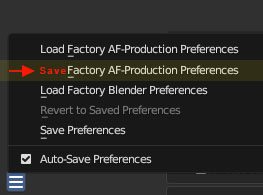
I would love to see the option to save the changes directly to the template directory, so it's in effect when Blender get's started up again.
Actual template path: ..\AppData\Roaming\Blender Foundation\Blender\3.6\scripts\startup\bl_app_templates_user
Something like this:
For now I move the files, if they exist and delete the ones Blender just saved, with a DOS script :)
Thanks for consideration!
0 Comments