
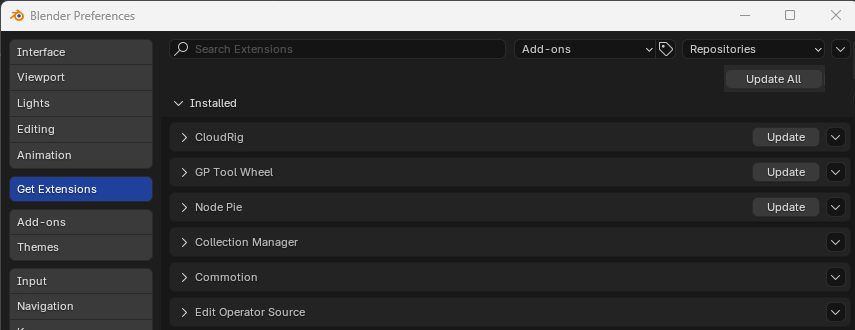
Update All extensions
Updating extensions is a bit of a chore if there's more than one to update (which is quite frequent):
- You have to click each extension's update button
- You have to wait for one update to be done before being able to click the next update button, which takes a few seconds at least (is this intended or a bug?)
Why not a simple "Update All" button?
9 Comments
Have you tried this?
I prefer the location suggested in this proposal, it's not very obvious in the dropdown. I wouldn't have even bothered looking for it and would've assumed it didn't exist.
I didn't even noticed that one existed. A big "update all" near all the other "update" buttons sounds more straightforward and practical to me. And similar to pretty much any "things updater" i and probably most users know.
You are right. I tried to do it and made a PR for this: projects.blender.org/blender/blender/pulls/130644
Awesome, thanks for the update!
Done! :) Thanks for the suggestion!
projects.blender.org/blender/blender/commit/3b2f0b4516b61a9f3bd6b1f017cf1c52812ecd5d
There is already the "Install the aviable Updatest" button, does that not already do what you whant?
A better UI?? If this isn't obvious at first look, the idea behind it is wrong.. ;)
Huh, the operator for install and update are the same, so maybe they need to add to the operator a for loop to make it simple.