
Select objects used by modifiers by an icon
Hello,
I propose to have an icon in the object field used by the modifiers to quickly select the aforementioned object.
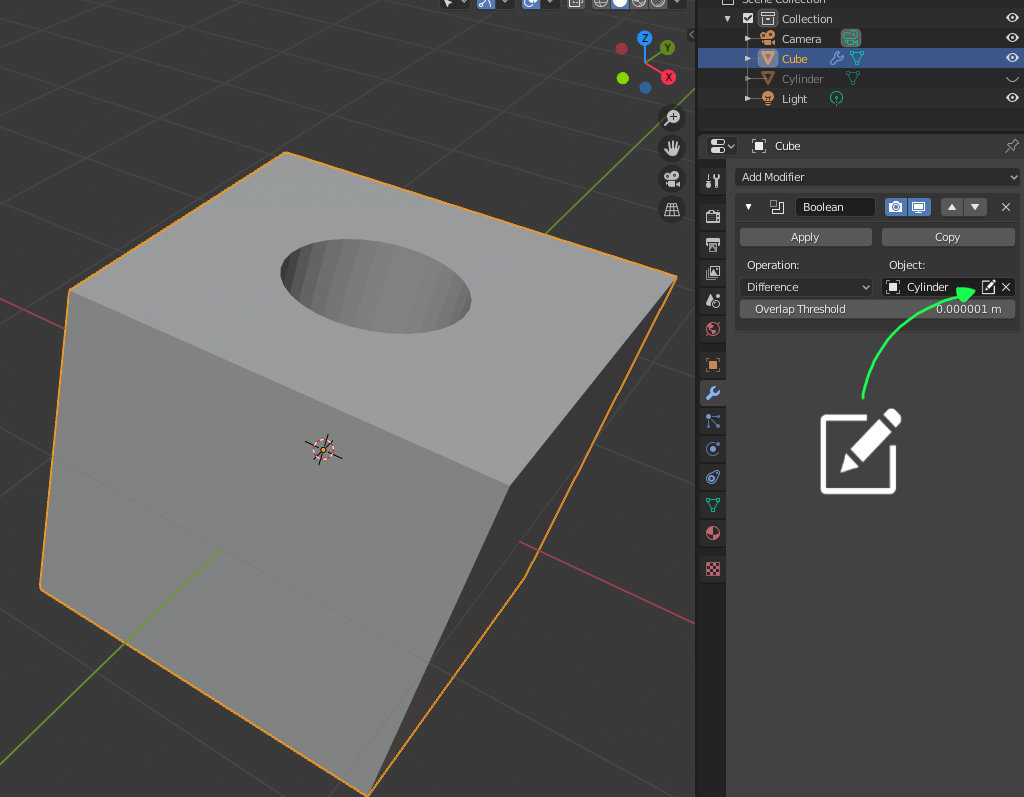
Let's say you have a box, you use a boolean modifier and you select a cylinder to cut an hole in the box. Now you do other things and then you go back to your box and you want to modify the cutting cylinder. Let's say you have a looong list of objects,it will require a bit of time to scroll the outliner finding the right cylinder, so I think it would be easier if you have that icon, close to the name of cylinder in the boolean modifier, to quick select the cylinder.
You can see an example at this link: imgur.com/a/60BaF98
A select/edit icon that appears when an object has been selected and enable the artist to fast select the object.
Thank you for your time
P.S. It would be even cooler if the object would be unhidden if it was hidden, as normally I do for boolean operations. Thank you again
3 Comments
Currently, you can do it with the Modifier List addon. You should try it, and in my opinion, it should be the blender default.
Right-click on the object field,
Jump to Target.If you want to bulk select all the objects being used to boolean an object also check out this: blender.stackexchange.com/questions/202184/select-all-targets-of-an-objects-boolean-modifiers