
Relax Points Node
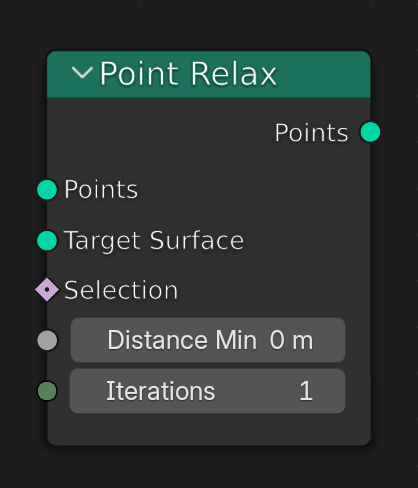 Scattering was one of the first workflows made for geometry nodes, so I find it almost strange we don't have a type of node like Point Relax.
Currently the way we get can get a more even distribution of points is with the Distribute Points on Faces Node with the Minimum Distance slider. This works, but it is not iterative, which really inhibits how uniform a distribution we can get. It is very helpful to have a way to relax points after they have been generated, and in a iterative way.
While it is true we can use the Set Position node in conjunction with the Repeat Zone as a workaround, as well as raycasting solutions etc., however as scattering is such a common workflow I do think it would be to the benefit of users to have a built-in node, not a community made one.
The Proposed **Point Relax node ** has the following:
- A geometry input for the points you wish to relax
- A geometry input for the surface you would like the points to adhere to while relaxing
- A standard selection input to affect the desired points only
- A Distance Minimum slider to chose how far each point should generally be from one another
- An iteration slider to decide how many times to run the relaxing operation.
I really hope we could have this built in to Blender, it would be a great help!
2 Comments
Can't you just use the "blur attribute" node blurring the position? You can even clamp the result to give a minumum and maximum distance.
You can't blur the position on free floating points. And it wouldn't follow a surface that way either