
Vertex Paint - Layer system and more.
Hi guys, I been working on a game project where our team uses only a Vertex Paint technique. This technique is not very easy but it saves u a lot of megabyte space fro your models. We tried Maya, 3ds max and Blender. I like the way of modeling and vertex paint in Blender. In 2.8 version of Blender, it's become easier to paint and see what you a painting and model at the same time. Also, more tools for painting you can get with an addon called "Vertex Color Master".
But Blender missing some very important features.
- Layer system for Vertex Color.
- Transparency support for alpha in 3D view for Vertex Paint.
- And attribute alpha.
Let's look it separate.
- Layer system for Vertex Color.
It the number one request. It has so many implementations. And with them, the artwork becomes much easier to produce and correct. Layers already exist in 3ds max.
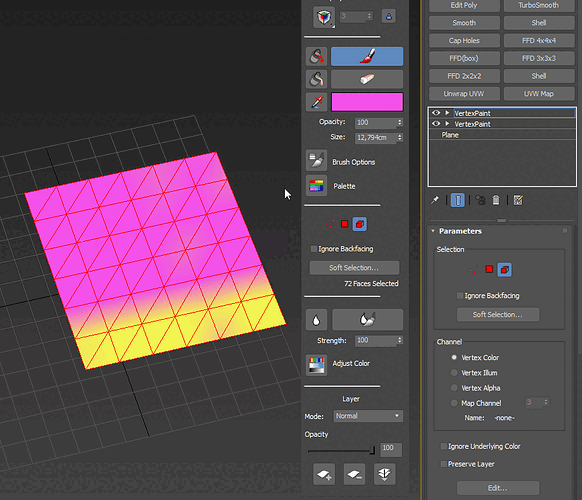
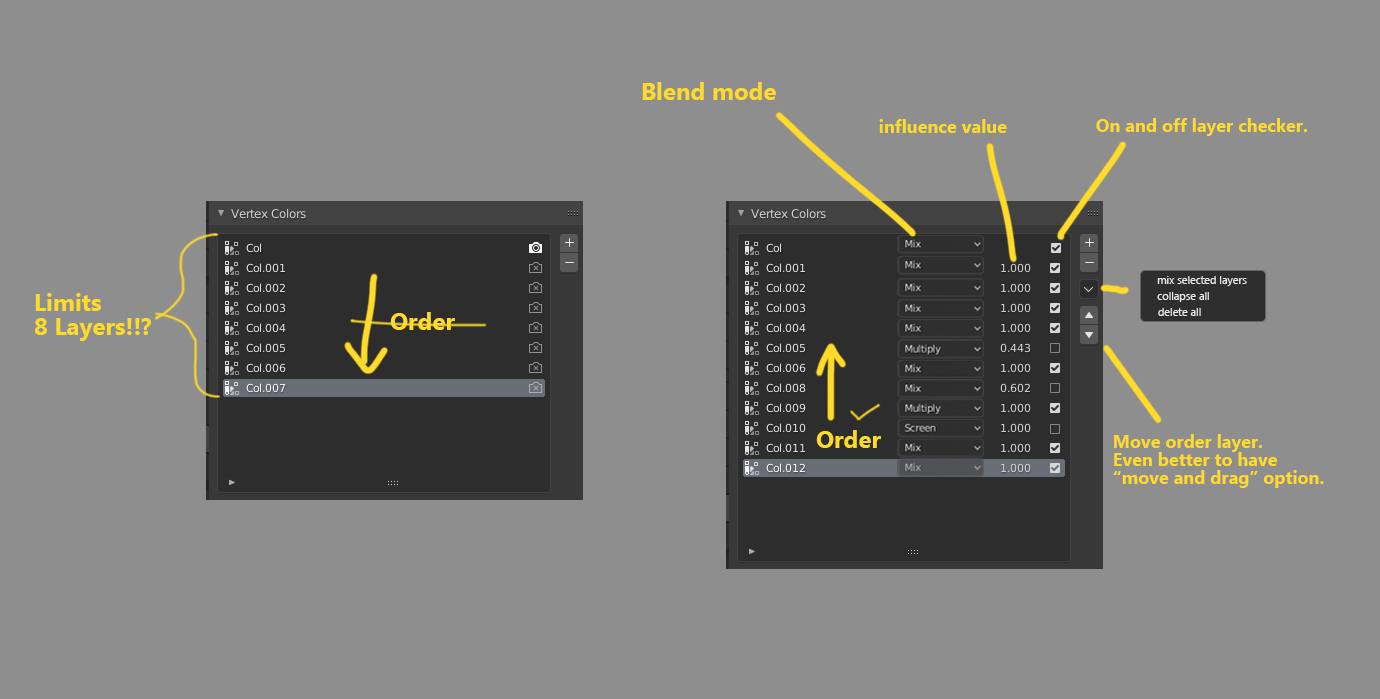
- We need a layer with blending methods between them. Like "multiply", "add", "screen", "overlap" and eth.
- Mix value for blending option.
- And feature for the "collapse all", "mix selected layers"
- Change the order from bottom to top.
- Feature to change order for layers. The best is to drag and drop.
- Possibility to have more than 8 Vertex color layers.
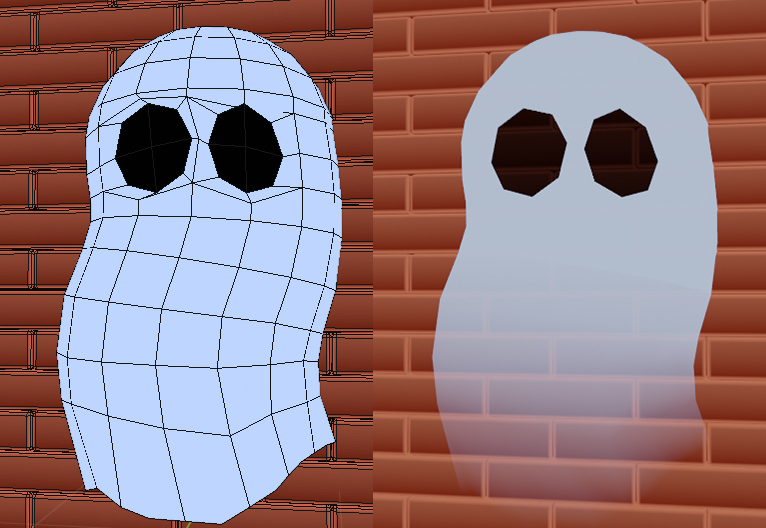
2.Transparency support for alpha in 3D view for Vertex Paint. For now, you can't see if the viewport if you paint the alpha. And it's a bummer.
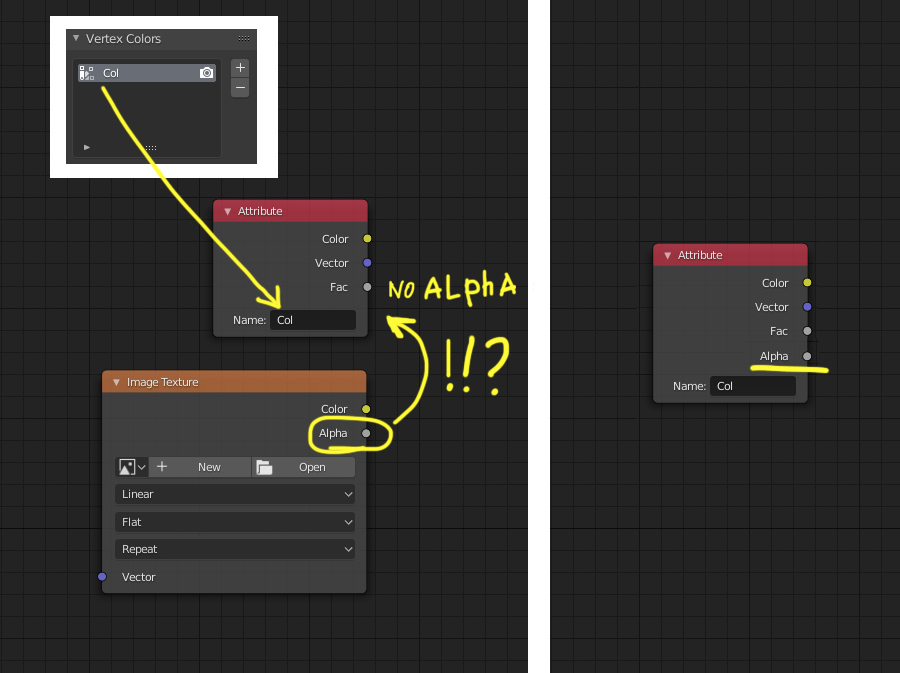
(Done) 3. No Alpha socket in Attribute. Thanks to Omar.squircleart this proposal is done.
I have different topic have to get transparency in 3d view. But method like that must be eliminated. blenderartists.org/t/vertex-paint-with-alpha-transperency/1164322
So, guys, I am ready to create a fund for developing this type of feature for "Vertex paint" technique in Blender. Hire a developer for this task.
18 Comments
I added support for alpha in my Google Summer Of Code project, so this should fix your second and and third points. See this weekly report .
* @Omar Ahmad * it's great news. Thank you for your work "Google Summer of Code" features. It covers the third request. I'm happy Blender user :).
For the second in it will be better to have a checkbox where you can turn on/off Alpha-transparency for Vertex colored model in "All" modes (edit mode, vertex paint, object mode) for the "SOLID" shading. "Vertex color transparency" checkbox can be placed in shader pop-up in3d view. And automatically turn on when we choose color shading of "Vertex" , for a user to see if he had alpha on the vertex color To see straight without any shading node adjustment. The third has a very close relationship to the second request, but it was possible to do it before in shader nodes without an alpha socket. But good that we have this possibility now. Previously it was hard. I describe how you can do it here.
blenderartists.org/t/vertex-paint-with-alpha-transperency/1164322
A checkbox will be a better implementation when developing Layers system for Vertex Colors starts. It just simpler to press a checkbox then create a node system.
* @Omar Ahmad * If you create such a checkbox it will be Perfect.
* @Vasil Matsuk * I see. This is probably outside of the scope of my GSoC project. Sorry.
You basically want to be able to manage color data from vertex colors, mixing them together with different factors or blending modes, you want transparency, ...
All this is only a matter of shaders , and that's exactly where you are supposed to go as soon as you want to render vertex colors anyways. Because vertex colors alone do not render, they have no influence on anything on their own, they are just values lists like vertex groups and don't do anything unless you use them somewhere else.
The only way to render vertex colors is by using them into your shaders, and that's exacly where you should head over.
AFAIK all the color management you want is already possible:
Just go in your shader, Import your vertex colors via Shift A → Input → vertex colors. Then you can do anything you want, it's just a matter of nodes setup.
If you want to mix an have blending options with factors, use the Color → Mix RGB node. If you want transparency, use a black and white vertex color as input of your shader's transparency factor. And so on. The only limits in there are the limits of the render engine. And since you're making a video game, that's the matter of your game engine's rendering features.
The only "missing thing" is an alpha value in the vertex color data. Right now if you want to make transparency out of you vertex colors, you either use a RGB as input (which isn't the more practical) or you create a separate black and white vertex color just for that, which is a bit more work.
Having alpha directly in the vertex colors data would allow you to store color and alpha in the same data and thus you wouldn't need to create two separate vertex groups. But AFAIK (and maybe I'm wrong), alpha is not a standard in vertex colors. So adding it in Blender may cause issues with file formats and other softwares.
Finally, about vertex groups collapsing, merging and sorting, sure! In fact I would request pretty much exactly what we have for vertex groups:

* @-L0Lock- * Thank you for covering all the requested feature. I appreciate it.
I also made shading cheating with different Vertex Colors Layers to able to get the transparency. Some time ago I create a post on Blenderartists.org how you can get it in Blender 2.8. blenderartists.org/t/vertex-paint-with-alpha-transperency/1164322
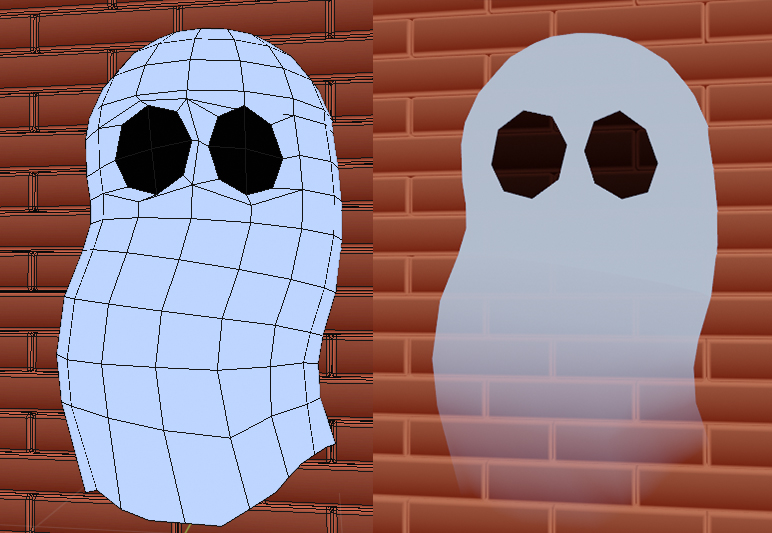
Blender supports the alpha channel for Vertex color. It has all four-RGBA channels, but the software doesn't show ALPHA. Strangely, brush in "vertex paint mode" affect Alpha channel, you have this in brush options. But you can't see transparency ( how we found out with easy way). With the Vertex Color Master help we can paint alpha, but what you can do with it is to isolate separate channel and paint. But you can see only black and white while you painting.
 Yes, shading with nodes can help, but it just too many moves. I use this method because of there no better way. And even if you mix different Vertex Layers in the node editor, it's only for shading. After it, you will need to merge it to one Vertex Color Layer for export to the game engine. For comparison, Maya has alpha-transparency support. And some model that looks solid in Blender was half-transparent in Autodesk Maya :).
* @Vasil Matsuk * Woah it's amazing !!!
Upvoted! Also, I've put a simple vertex layer painting tool for Blender on github. Hope it helps a bit, any feedback much appreciated. Link
M Salut à tous !
Je suis tombé sur ton message en faisant une recherche pour le nom de l'addon que je suis en train de créer et j'ai l'exact solution à ton problème.
J'ai rencontré le même problème lors de test en vertex paint. Je me suis donc mis en réflexion pour créer un système que j'ai appelé exactement VPLS - mon système fonctionne pour le moment en scripting et est fonctionnel, il n'est pour le moment pas encore encapsulé comme un addon mais cela ne serait tardé, actuellement il est fonctionnel et testé sur blender 4.5.9 LTS, j'ai testé jusqu'à 5 calques, de plus ce système m'a permis d'ajouter un pinceau effaçable jusque là indisponible sur vertex paint.
Cet outil est développé dans le cadre des besoins de notre studio Enjoy Graphix et sera commercialisé. Néanmoins je reste ouvert à la proposition de fond de soutien au développement. Je dois encore créer l'interface menu d'utilisation avec la création du matériau et l'ajout automatique de calques dans un matériau unique.
Fonctions actuelles système de calque simple et effacer similaire à krita, photoshop etc... Je dois encore améliorer les options car lors de mes tests j'ai pu envisager de créer également un masque d'ecrétage et d'autres options plus avancées.
Je réponds à ton message depuis mon smartphone mais je reviens dans la journée pour poster une vidéo de démonstration.
Et pour être honnête c'est excellent 😁
Here's a screenshot of the multi-layer vertex-color editor I've been working on. It'll be easy to integrate vertex alpha nodes once they're available. {attachment sxtools-blenderpng}
* @jani * Hi, Jani. I try to "Merge up" and "Merge down" buttons. And it gives me an error.
* @Vasil Matsuk * My apologies, I'm still porting over a lot of stuff from the Maya version, and may be accidentally breaking some things in the process. Merging layers is working in the latest version on github.
Also, check that you press the "Set Up Object" button when you first click on a mesh. The tool adds vertex layer sets named "Composite" and "Layer 1" to "Layer 7". Right now it looks like the color sets on your object are manually added.
If you have data on the object that you wish to retain, renaming your existing layers to Composite (index 0) and Layer 1 etc. for the other indices should keep the data on Layer 1 in place. Composite/index0 will be overwritten as part of the regular refresh/update process of the tool.
I haven't at all looked into retaining existing vertex color data on objects, it might be a simple case of just renaming the existing layers and re-indexing them, if vertex color layers can be re-indexed in Blender.
It's probably a good idea to break this up into separate proposals to the individual ideas can be addressed on their own.
You can add pictures using this markdown code:
Make sure to use the picture's direct link (you can recognize it because it ends with the file's name with extension), otherwise it might not work.
Alternatively you can drag-and-drop pictures in RCS's text editor, that will save you to upload the pictures yourself on a server, but it will convert into jpegs so don't do that with animated GIFs.
Thanks!
* @-L0Lock- * I tried with no success. Drag and drop to the text view reset google chrome to a new tab with an image. Links also didn't work. I tried copy image link and it's too long.
* @Vasil Matsuk * Well if that webstite can't display its pictures in other websites, I would recommand not using it in the first place.
* @-L0Lock- * Finally I manage to add the images :). Now post look more clear.
yay \o/