
Feature Request: Add 'Collection Mode' to control collections as grouped objects
Proposal: Add a 'Collection Mode' so users could select and manipulate a collection of objects. This would be similar how users could move and manipulate 'Collection Instances' but add the feature of being able to jump into object/edit mode quickly and make changes instead of having to "make instance real".
While in 'Collection Mode' objects outside of a collection would function in the same way as in 'Object Mode'. 'Collection Mode' could be added to the pie menu or it could be accesses by another shortcut.
Below is a screenshot of where you would find it in the viewport dropdown menu.
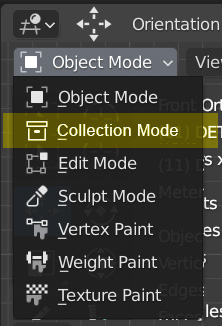
5 Comments
What happens when an object is part of multiple collections?
What happens when parent and child are in different collections?
(What happend == eg. moving, rotating operations)
* @muhuk * You could think of this like you would in Photoshop with 'auto-select: layer/group' and Linked Layers. Photoshop's 'Layer' mode would be analogous to Blender's 'Object' mode, 'Group' mode would be analogous to my proposed 'Collection' mode, and 'Linked Layers' would be analogous to 'Parent/Child' objects.
While in Photoshop, if you use 'Layer' mode, you will select layers like normal even if they're within a folder. If the layer you select is also linked to a layer outside that folder, they move together as one.
While in 'Group' mode, if you select any layer within a folder, all other layers in that folder will be automatically selected and moved as one while ignoring any 'Linked Layers' outside the folder.
An option could always be added in Blender to respect or ignore the Parent/Child relationships while in 'Collection' mode depending on user preference.
Layers in Photoshop cannot exist in multiple groups at the same time. Smart Layers (instances) can but each is its own unique layer that just happens to use the same internal data as other layers.
You did not answer the question: "What happens when an object is part of multiple collections? "
Collections are not meant to participate in 3d space hierarchy relationships. What you want is groups/parenting and a way to select only items that have children (which gets complicated when children and grandchildren are groups themselves, but Affinity Designer has a good double-click approach to handling that)
devtalk.blender.org/t/ctrl-g-should-be-bound-to-move-to-collection-new-collection-not-create-new-collection/8872/27
This have some sense.. around origin work maybe, but I still thinking that Component is needed ;p With this are other problems maybe.. external files.. blender.community/c/rightclickselect/Kghbbc/