
Add option to save preference as file
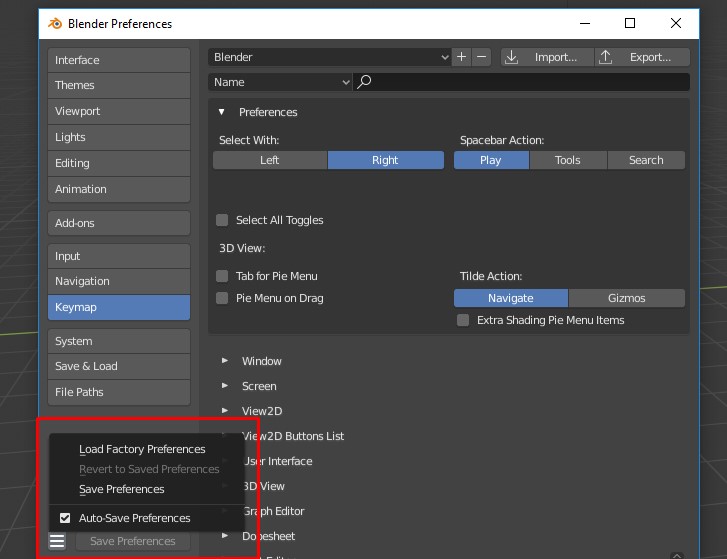
Please make option to save preference as file so whenever i go i can take my settings and easily use on any pc. I just update version to 2.8 and for unknow reason blender everything set as default, i lose all my shortcuts and can't bring them back i guess i need to go again all over and set my keys. This kind of "problem" can be easily escape if you guys make option to save preference file and load it whenever this is happen.
6 Comments
All setup as a blend file, go to %APPDATA% folder (
C:\Users\User\AppData\Roaming\Blender Foundation\Blender\Blender version\config).Hi.
Isn't what Smart Config does?
blenderartists.org/t/smart-config-import-export-full-blender-configuration-with-addons-in-one-click/1101316
* @ xan2622 * Oh, didn't know for this addon, thanks. Something like that but more intuitive will be great if they make as blender default.
As already mentioned, your preferences are already saved to a file. You just need to grab it.
That said, it might be nice to have an import/export option for people who, for some odd reason, don't want to work with their system file manager.
* @Jason van Gumster * It's a little hard to go through the hidden system files looking for a config file. Mysterious for those users that don't really understand computers that well. The average user can't be expected to know where to look for that sort of thing (even though they should know, as a basic component of computer literacy). Also it's stored in a different place per OS.
I think there should be a utility to import/export, and an option to copy to clipboard. Blender could keep a folder in its install location for config presets, and just echo whatever config file that has been saved most recently to that location.
* @Jason van Gumster * well exporting you create a file. so ok export import. but why "install" in themes and no export?? I'm about to stop to search why...the real question is about accessing to these files more that exact terminology and sometime strange terminology.