
Ctrl+C - Ctrl+V for copying modifiers to other objects
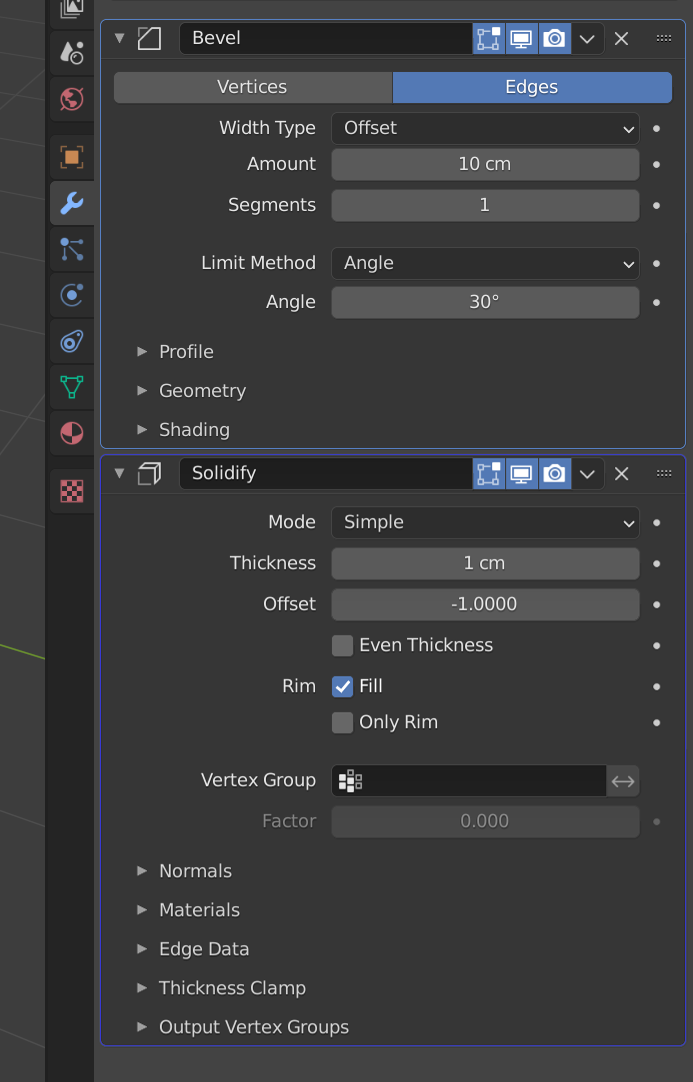
Since geometry nodes was introduced, we now have the concept of "active" modifier, defined by a blue outline, giving us the ability to select modifiers. While this was done for switching between different geometry nodes modifiers, I think this is the perfect occasion for extending the functionality and being able to select one or multiple object's modifiers, press ctrl+c, select another object and press ctrl+v to paste them. Before you say that there is the "Copy to selected" operator in the modifier menu, or the copy modifiers in the object menu I propose this because it feels more natural, easy to do and less hidden, in addition to permitting to copy multiple/selected modifiers. This is how would look selecting multiple modifiers, with the first selected having a darker outline, like objects in the 3D view:
6 Comments
That definetly needs the option to either copy or instance modifiers as well.
blender.community/c/rightclickselect/WPqg/ Armature inheritance as Independent solution and Instance
Also we need Ctrl D
You have the copy to selected option
Like I wrote in the request "Before you say that there is the "Copy to selected" operator in the modifier menu, or the copy modifiers in the object menu I propose this because it feels more natural, easy to do and less hidden, in addition to permitting to copy multiple/selected modifiers."
The active/selected thing is still hard for me to confidently use after 3 years of using blender daily. #1 i'm colorblind so I don't notice the color difference between what's active and what's selected, #2 I'm absent minded so I quickly forget which one I selected first or last, #3 that I think is most important is that the naming "selected" is just unintuitive to me, I have to have 2 things selected and somehow I need to know the order and I have a hard time remembering if the first thing or the last thing selected is the "selected" being referred to :'( If it was something more verbose like "copy from last selected object to second-to-last selected object" then I'd be using it all the time.
This proposal is a huge improvement. Click this object. Copy the modifier. Click that object. Paste the modifier. Click 20 objects. Paste the modifier.