
Inconsistencies in "only show selected"/"Show Hidden" and keyframes belonging to hidden bone channels
Issue:
 Blender's Dope Sheet has an icon called "
Only Show Selected
" enabled by default (Pictured above). This will only show selected object's animation channels, but since the dope sheet is designed to show you all the frames, it will also display these frames which are un-selectable and undeletable. The icon next to it called
Show Hidden
which will display channels of bones from hidden layers.
Blender's Dope Sheet has an icon called "
Only Show Selected
" enabled by default (Pictured above). This will only show selected object's animation channels, but since the dope sheet is designed to show you all the frames, it will also display these frames which are un-selectable and undeletable. The icon next to it called
Show Hidden
which will display channels of bones from hidden layers.
UX inconsistencies:
-
But these frames actually can actually be deleted . If you press x > Delete Keyframes nothing will happen, but if you position the time slider on the frame with the keyframe and press alt+i in the 3D viewport you will delete the keyframe, leading to more confusion about the nature of these keyframes
-
Even when "Show Hidden" is off we will still be able to see keyframes, but only in the Action Channel (See below). It makes sense that we can always see all the keyframes, but in the Summary. Having a button tell us it will hide unselected, but still show us some keyframes somewhere seems confusing
-
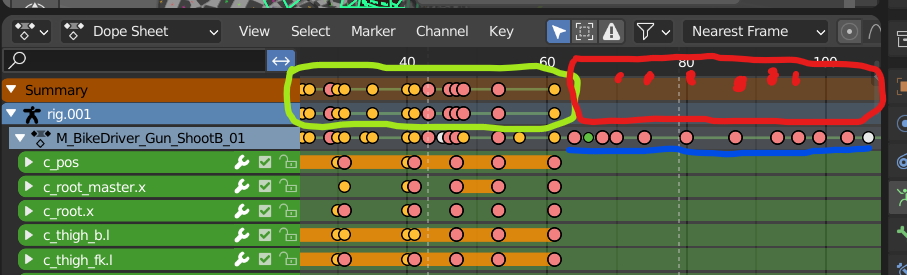
(See image below) Weirdly when "Only Show Selected" is enabled these uneditable keyframes will show up anyway under the Action Strip in the Dope Sheet Editor ("M_BikeDriver_Gun_ShootB_01" action strip in the image below) but they won't be shown under the Rig or Summary strip itself. I would assume that the Summary strip is absolute and shows everything existing that's keyed. I can't understand why these keyframes would be shown in the action strip alone, especially because if we enter the Action Editor these keys are nowhere to be seen. The expected behaviour to me would be to display these keyframes in all parent strips (so the keyframes underlined blue which are on a different bone layer would appear in the area circled red, just like the keyframes which are editable appear in the area circled green)
How I arrived at the issue without ever knowing what the problem might be:
The common way to keyframe armatures is by I>Key Loc,Rot,Scale, but for more serious projects we'll be using Selections Sets, especially for game animations where it's essential that nothing is left un-keyed. When I used the 'Whole Character' set which I haven't used before I was keying bones that are on hidden layers without even realizing it (They were incorrectly named by our rigger so they didn't contain prefixes such as ORG that would prevent keys from being set), so when the 'immovable, undeletable' keyframes appeared after I offset the keys it didn't even crossed my mind that this what was shown was representing keyed bones on hidden layers, and because it wasn't shown in the Summary, wasn't deletable, and didn't appear in the action editor I was convinced I'd came across a bug.
I've been using Blender for a long time and I animate professionally in it. So it seems that even long time users can get stumped by this if they aren't aware of what these buttons do. When I reached out to communities of professionals on Discord to understand this issue I was told that other teams have been running into this as well, so I thought it was worth writing these suggestions
Suggested Solutions:
- Have "Only Show Selected" disabled by default in the Dope Sheet Editor and have "Show Hidden" enabled by default
- Have Summary and rig strips always display all keys in a scene regardless of hidden status or hidden layers
- Also display these keys in the Summary of the Action Editor for consistency
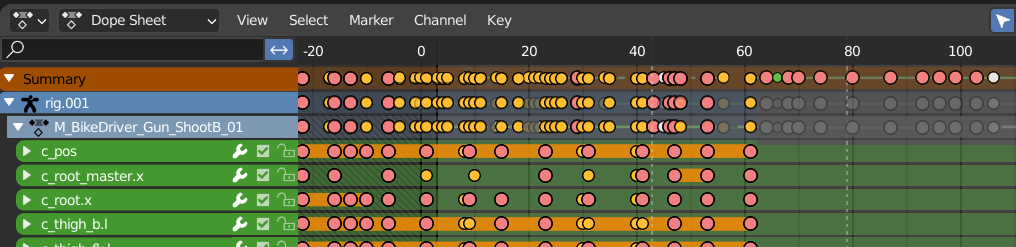
- Implement new key icons that convey something is different about these keys
This is a visualisation that I've made in an attempt to improve clarity that what's going on isn't a bug. Maybe not the best solution but I think the lowered opacity implies layers that are not editable, and setting them to black and white removes visuals noise from the frames that are editable.
We are on Blender 3.3 so if this does get implemented it would be nice to see it in LTS branches. Thank you for reading!
0 Comments