
Cursor Defaults & 'Cursor to Active'/ 'Cursor to Selected' Operator Menu or Orientation options
So I regularly use the Shift S --> Cursor to active/selected commands.
What I'm seriously lacking in this command is either an option or operator menu that would allow these commands to match the rotation of a selected face without me having to first manually match the rotation with the 3D cursor tool/shift right click.
I'm not sure if there is already an option for this, but changing the orientation setting inside of the 3D cursor tool doesn't carry over to either these commands or the shift right click 3D cursor placement.
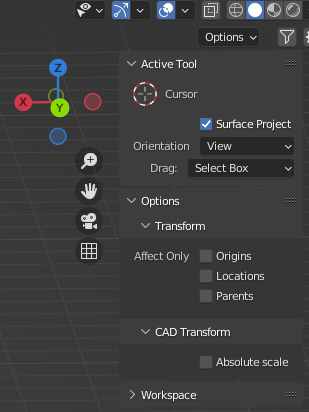
This would be fantastic for hard surface modeling, where I often want my cursor to match a faces orientation.
Additionally, I think that in edit mode, Shift Right Click 3D cursor should inherit face rotation by default, this just seems more intuitive to me, but maybe I'm alone in that. I can imagine that animators and riggers might want different behavior by default, so maybe separating these would be best.
Not only is this not default, but it took me a stupid amount of time to figure out how to set this as the default behavior because the 3D cursor tool option isn't inherited by the shift right click version. The actual option I was looking for is buried in the keybind settings, in a collapsible menu(why!?!??!?!?).
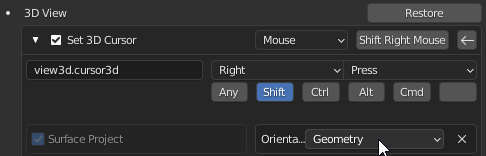 I've seriously wondered where this was after years of blender use. Even google couldn't save me. It seems most people just engineer ways around this. The average user isn't going to find this option.
Ultimately all of this stems from a desire for a more intuitive 3D cursor, but the solutions don't have to the ones listed. Just having the 3D cursor always match the tools orientation settings would be great; but better defaults and more exposed options would be best, which is why I suggested an operator menu.
Thank you!
3 Comments
You just use the default Snapping Tool (The Magnet, put it to Surface Project and Align to Rotation, you can toggle it on or off with Ctrl+Shift. imgur.com/lIfiti4
You need machine-tools if you want them to appear in the Snapp pie menu, it adds new buttons in the snap menu for you that already have the keymap settings applied.
So the issue with the 3D cursor tool isn't the lack of ability, but rather that I might have to go into my snapping settings and change things before doing it. If I was using snapping for some other purpose(maybe I'm on vert snap, or I'm not set to align rotation), it introduces an extra step in the process. It's a paper cut; but it does slow down the workflow.
The issue with shift S cursor commands are more pressing. It should be a one click solution to snap to active/selection and inherit normal or local rotations, but right now I don't think there is a way to do that.
Come to think of it, this doesn't even appear to be an option when creating new geometry within a pre existing object via the add mesh menu in edit mode. ( I have an image, but it doesn't look like I can post image links)
It seems like local transform should exist in this menu, and that shift S cursor commands should have a similar menu pop up. Maybe I'm missing something?
Obviously you can use copy attributes to copy rotation of the object once you've added it, but I feel like these minor inefficiencies add up, and they don't sound terribly hard to fix.
Upvoted!!