
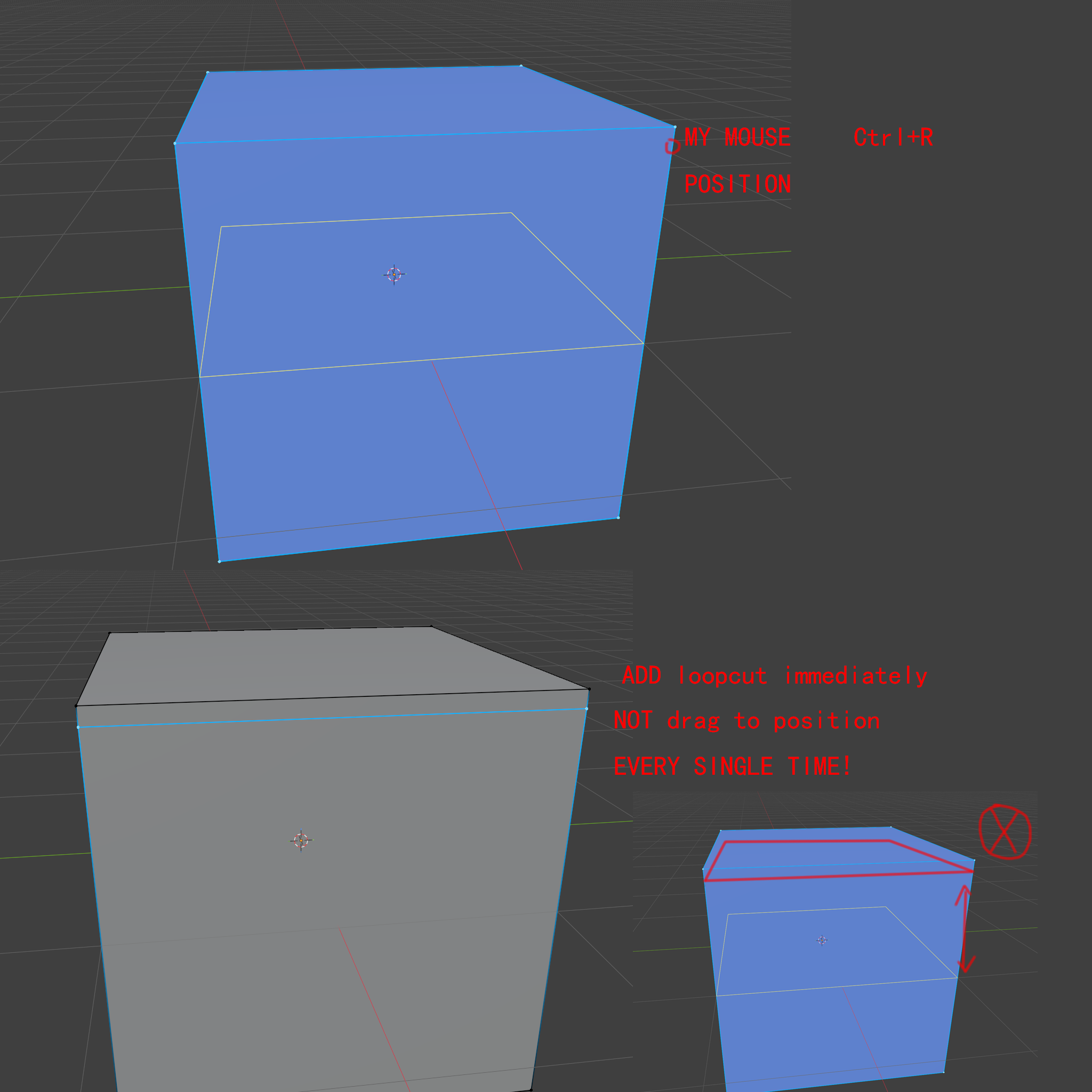
ctrl+R loop cut Mouse Postion immdiantly
I’d really like to suggest a change to how Ctrl+R creates loop regions.
Right now, every single time you press Ctrl+R, you have to drag the loop region to your desired position—over and over again. This becomes incredibly tedious and frustrating, especially in large projects where you need to add many loop markers quickly.
What I’m proposing is simple: when you hover your mouse over the timeline and press Ctrl+R, just create the loop region right at the mouse’s current position immediately—no dragging required.
Of course, if you right-click (or use the existing method without hovering), it could still default to placing the loop in the center, preserving backward compatibility.
Alternatively, if the team doesn’t want to change the default behavior, could we at least get a toggle in Preferences? Something like:
Loop Creation Mode:
Legacy (drag-to-place)
Mouse Position (instant)
This small change would massively improve workflow efficiency and precision—dragging is not only slow but also imprecise, requiring constant micro-adjustments.
9 Comments
In my opinion the best option would be if the cut would be drawn right away where it will be and the cut would be applied with a single left click. And at this stage, you could use ctrl to snap, C for clamp, etc.
I just find the two-clicks way a bit awkward to work with.
But probably it would mean rewriting the whole tool, as it's now 2 separate operations.
i agree, only pressing ESC should go in the middle
Yes, I agree (or right click).
The reason it does this is because the loop cut tool also executes the edge slide operator immediately after the loop cuts are placed.
The edges would still be able to be moved in the same way later using just the edge slide tool by itself.
What I mean is: even when the sliding mode is active, the initial loop cut should appear exactly where the mouse cursor is hovering at the moment you press Ctrl+R—not always start from the center of the edge. Right now, if I’m trying to add a loop near the edge of a face, I have to slide it all the way from the center to my intended position every single time. Doing this a few times is fine—but doing it hundreds of times in a long modeling session is honestly exhausting and inefficient. It would feel so much more intuitive and responsive if the loop just spawned under the cursor immediately, and then you could slide it if needed.
Maybe kind of like Knife Cut through behavior, but respecting the flow of the loops then.
Yes, sliding should still be possible—but the initial loop position should be exactly where the mouse cursor is when you press Ctrl+R, not always starting from the center.
See this: Proposal to change loop-cut behavior and how old this is 😭 ...
Haha 😄 — 12 YEARS OLD! And yet, we still haven’t given up! With AI-assisted coding these days, maybe this dream is finally becoming actually feasible… 😂 I mean, come on—Blender’s already at version 5.1!