
Proposal - render property panels in 2.8
Reorganisation of output, engine and layer settings
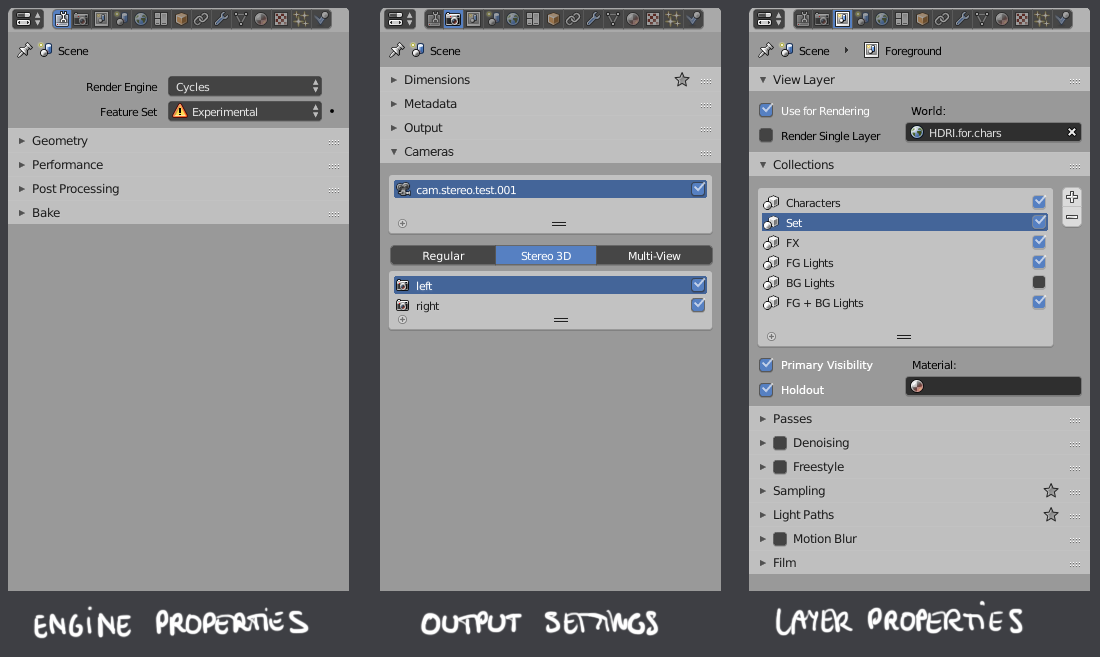
Many render settings seem oddly placed in the user interface. Engine-independent settings are mixed with specific ones, and not necessarily on a tab that makes sense for them to be on. My proposal is to group them on a more logical basis. Note that I am generally not going into detail about things that I don't feel I have a specific opinion on; on the image, these panels are collapsed, but still moved to a tab that I feel makes more sense. The panels that are open are new or modified.

Engine Properties
No specifics to go into. General rule of thumb is to put here the more technical , under-the-hood settings of the selected renderer. Cycles's Bake feature can go here too.
Output Settings
This is where I would put the more generic image file settings. Dimensions, metadata, file path, etc. The point is that these should have absolutely nothing to do with whatever renderer is active.
Layer Properties
Inspired by this suggestion , I propose to move quite a few properties (mostly engine-specific, but not necessarily) from the scene to the layer scope. This in part eliminates the need for an override system, as they encompass a bunch of settings that often could use a layer-based override.
An override feature that I would add, though, would be the World - when a lighting artist wants to use a different HDRI or color on a specific render layer, or kill all shading and lighting and render out a separate volumetrics layer for comp. Come to think of it, frame dimensions would be a welcome override as well - data ('tech') layers for compositing are often rendered at double resolution, something as of yet impossible in Blender.
The image also shows what I think is the most important advantage of having collections . The list control allows to toggle between it either being considered or ignored by the active layer. The options underneath allow you to toggle primary visibility , matte/holdout and a possible material override for that specific collection, on that specific layer. Primary visibility is a Maya term that means visibility in camera rays, disabling it would cause the renderer to only show the collection's secondary rays.
Related: does the Workbench engine still have a purpose?
Given the fact that the Workbench engine does not have any properties (including generic output settings such as frame size and file path?), I'm beginning to wonder whether it still qualifies as a render engine. With the rewritten viewport, the solid display mode is perfectly fine for any non-shading task, and looks exactly like all of Workbench's display modes, regardless of whatever output engine is active. I'm just wondering whether or not it 'deserves' its place in the render engine menu.
1 Comment
This is one of the little annoyances in Blender, inconsistency of functions trickled all over.
The examples of how one could do it, is to look at the render managers of Softimage and/or Maya. More or less everything in one place to be found and adjusted.