
Collections should get transforms
Hi it look like emptys and collections have a similar functionality, but both only at 75% of whats needed for good scene managment.
Emptys can be used as parents to transform, but are more tedious to set up and cant be used for collection instancing.
Collections are the current base for scene management, but dont have a parent transform functionality.
So if i want to move a whole collection i need to actually move all its child/leaf objects. It works but seems to be not ideal/efficient.
In usd/solaris im used to that the parent group can be moved and the whole scene/objects below inherit that transformation. So i can move thousands of objects, instanes, etc by simply selecting the root primitive.
Below you can see which objects (the ones in the red circle) i have to select to move the boy and bat and bed from the example file. Once in Blender and in Houdini.
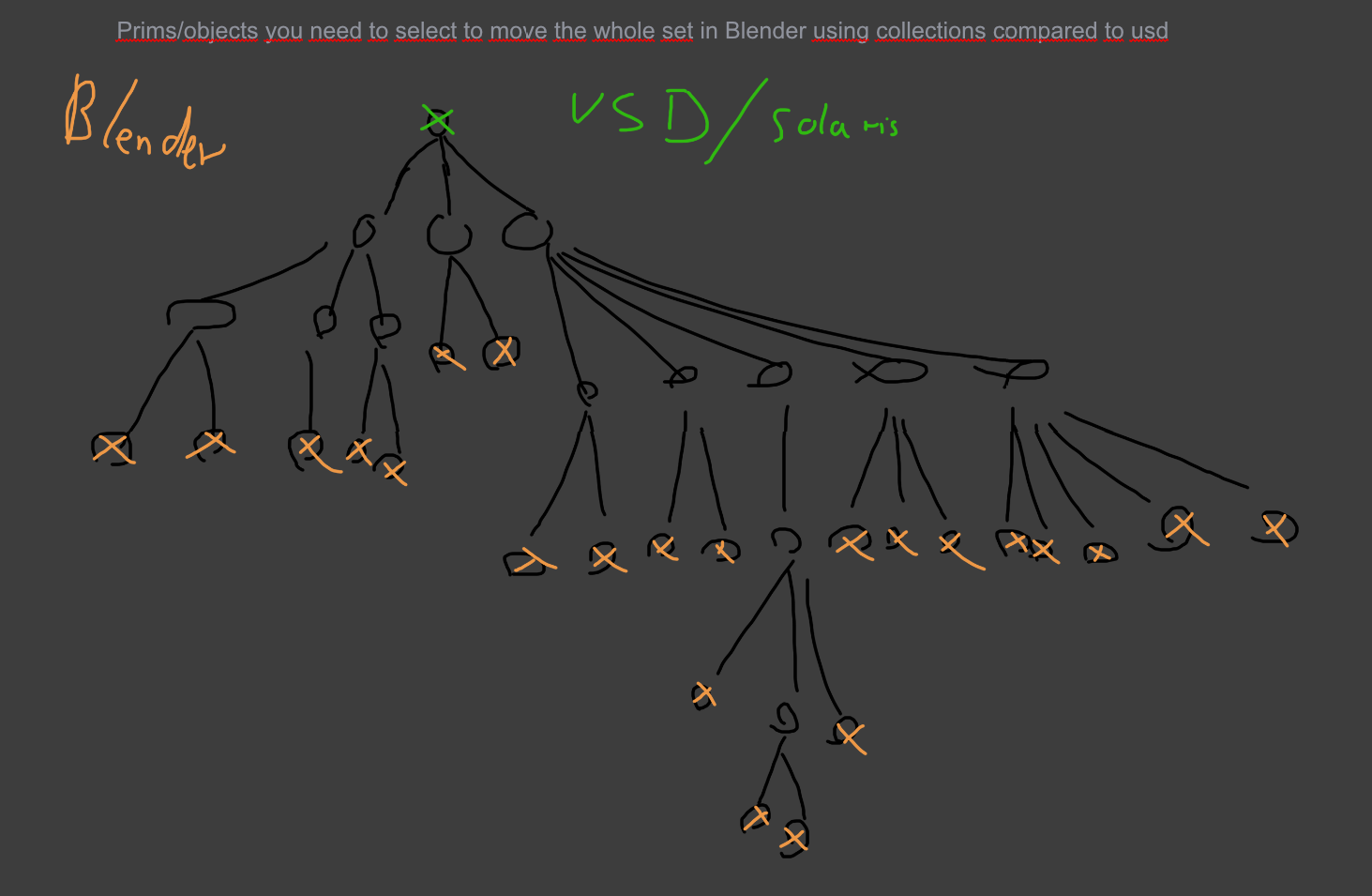
Below you can see that example with an theoretical scene tree. In Blender you have to select all leaf/geo objects using collections, if you would want to move the whole set.
Let me know if im missing something here.
6 Comments
I wish collections weren't just tags for objects. I think they should have transform, lock/unlock, selecting in Viewport, that would be useful for big projects.
And/or grouping, like every other graphics program.
Hello, due to Copy Right Concerns, Blender website generally forbid users to attach screenshot from copy-righted software, such as Houdini to prevent any kind of lawsuit. See: devtalk.blender.org/t/copyright-guidelines-for-devtalk/17331 It seems multiple of your posts are violating the rule. Would you please take actions?
I really love these collections
I understand what you are getting at. However, the way I see collections is simply a way of organizing objects in the outliner (a container if you will) and not an object type with positional data (Transform, Rotation, Scale, etc.).
Also, it's not as hard as you make it seem. To select all the object(s) in a collection, simply Right-click > Select Objects.
On top of that, an object that is not visible in the scene, with positional data, can create lots of confusion. This is why empties have a visualization with a plain axis.
Yes its not hard to select the objects in an collection, but its one extra step to click, and every click saved is good as you ganna do a lot of clicks during the day.
Having a container for just "decoration" purposes is not that usefull. Like in reel world container exists to handle and move many objects by just handling one object.
I think maya has groups which are not visible but work just fine. If it too confusing for beginners it could show its pivot and or plain axis if its selected. Or have an toggle which allows the collection to be selected/moved/behave like an real object.
I think it would be very helpfull for big scenes if the layout people go crazy and place thousands of assets.