
Python Script Warning Dialog
With a button labeled "Ignore" in many software situtions, the inference by the user can be "Ignore this warning."
However, this particular IGNORE does not mean that. Changing the label on the button would make it more clear what the dialog is asking the user to do.
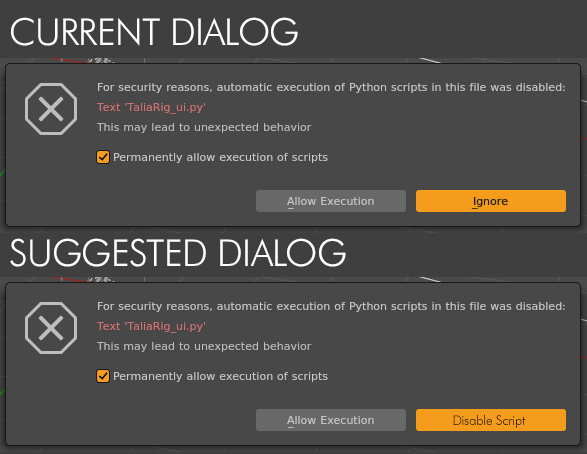
Further, it seems somewhat ...dangerous? That the default for "permanently allow" is checked ON, when the user is literally being warned that a security risk could be present.
5 Comments
Maybe "Keep Disabled" instead of "Disable Script", because AFAIK it isn't asking to authorise "this script" in particular but rather "all scripts for the current blend file", and if you get that popup, it is because it is already disabled, hence the current "ignore".
Now about the questionable by-default-enabled checkbox, AFAIK it is because:
I'll point out that this in itself also isn't obvious, in the dialog. So perhaps there should be some language tweak there as well.
(X) Permantly allow execution of scripts in this file
In addition, if the checkbox is ON, but the user clicks IGNORE - what happens? It's all rather vague, and should not be - given how dangerous an ill-intended script can be.
I think you don't know the power of geomantry nodes
youtube.com/shorts/1kNS9buj0bM
Bumping! My work just got hit by a malware from cgTrader
Thanks for the suggestion. Marking it as Done, it's coming to 5.3 together with a few other changes: projects.blender.org/blender/blender/pulls/164055