← All ideas4 Jul 2020MickHanksOpenGeneralMickHanksAnityExBranskugelDhruvin743Fyne-QJhonR3dOskarXYZSainex.nikitabestelixckohl_artcmykcatdcb.creativedemmordorfrancis.teslajacopo.voltolina.officialkarmakarsouvik025kq.designerlacina.vojtechlucaslemecardosomuhukreguza64sickmonkeydubsqeee
*
@Shimoon
* Best will be rhino like gimbal (in rhino they call it gumball)
I
IIIFGIII
*
@Shimoon
* Because most of those guys who ask for this useless " gizmo " something - newcomers from some 3D Max, etc.. They have no ideas about PIE's, PME addon, all that stuff. Same as they can work without gizmo faster than with ...
a
arkoprobhogupta23
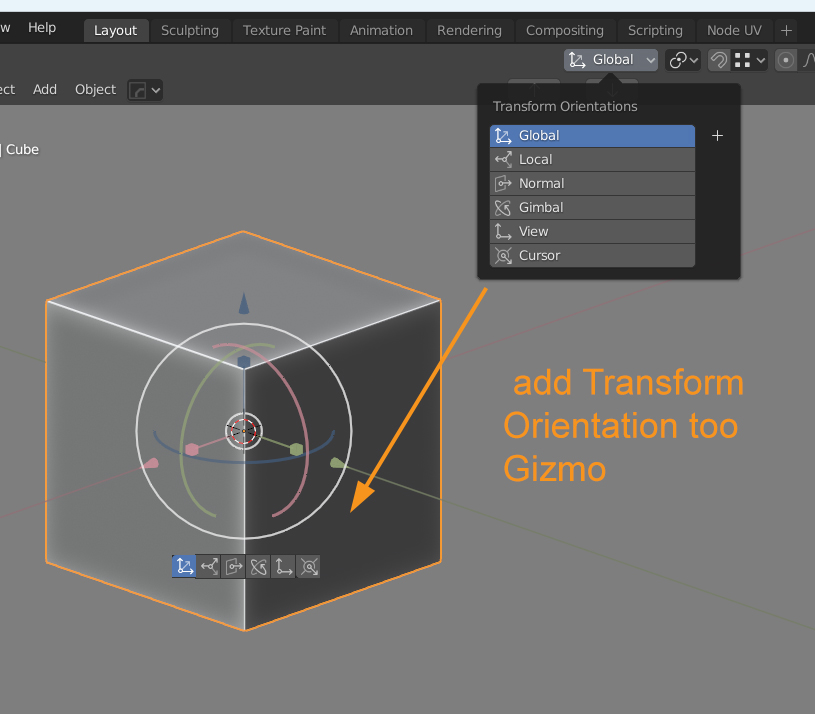
well i mostly use g then x or y or z.....rather than clicking on buttons which appear near gizmo it will be better if we are able to change orientations on the fly ....in that way our operation will be faster and those buttons will not cover some edges/points which we want to see during mesh manipulation
1
M
MickHanksAuthor
*
@arkoprobhogupta23
* But not all of us can use two hands
1
a
arkoprobhogupta23
*
@othoap
* then in that addon there should be two options in Blender's preferences one ....for two handed mode...and one for one handed mode....
1
M
MickHanksAuthor
I'm also going to ask this developer if they would add too there addon
*
@arkoprobhogupta23
* Sadly I only PS it. I was going to ask Blender Stack if this was possible
x
xdaniel
What about right click on the gizmo for these options?
B
BlenderSplendor
The icons are too obscure and it clutters the viewport. I need the names next to them. It could be an option in preferences though.
c
ckohl_art
I think a good way to activate Transform Orientation on the gizmo would be a held button. While held the row of buttons is visible; on release the row is hidden so as to not obscure components.
a
arkoprobhogupta23
*
@Chris Kohl
* Best will be rhino like gimbal (in rhino they call it gumball)

13 Comments
Why not using the existing pie menu for it?
* @Shimoon * Best will be rhino like gimbal (in rhino they call it gumball)
* @Shimoon * Because most of those guys who ask for this useless " gizmo " something - newcomers from some 3D Max, etc.. They have no ideas about PIE's, PME addon, all that stuff. Same as they can work without gizmo faster than with ...
well i mostly use g then x or y or z.....rather than clicking on buttons which appear near gizmo it will be better if we are able to change orientations on the fly ....in that way our operation will be faster and those buttons will not cover some edges/points which we want to see during mesh manipulation
* @arkoprobhogupta23 * But not all of us can use two hands
* @othoap * then in that addon there should be two options in Blender's preferences one ....for two handed mode...and one for one handed mode....
I'm also going to ask this developer if they would add too there addon
youtube.com/watch
Did u photoshop it or do u have the code for it ?
* @arkoprobhogupta23 * Sadly I only PS it. I was going to ask Blender Stack if this was possible
What about right click on the gizmo for these options?
The icons are too obscure and it clutters the viewport. I need the names next to them. It could be an option in preferences though.
I think a good way to activate Transform Orientation on the gizmo would be a held button. While held the row of buttons is visible; on release the row is hidden so as to not obscure components.
* @Chris Kohl * Best will be rhino like gimbal (in rhino they call it gumball)