
Move Armature's X-Axis Mirror to a better visible place
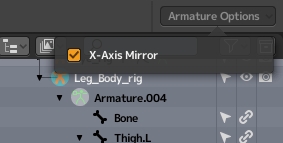
Hello there! A suggestion to improve current UI! I've spent a whole day searching for X-Axis Mirror in 2.8 in Armature Edit Mode because my top (or header I dunno) tab was hidden in the UI as I like to work in fullscreen mode and hide all unnecessary elements of UI. Please move it somewhere more visible, make it available in Armature Context Menu (The one that drops-down when you right-click in edit mode) or Armature tab in the left top corner or make it available it somewhere in Armature Properties. Having it only in Header is really bad as some people (like me), hide the whole thing to win some space. I have it in my quick favorites, but still I spent quite a while before finding that option hiding in the bushes.
3 Comments
This isn't an actionable proposal. Where in the UI would you put it? How would you make it fit and remain consistent with the rest of the UI? This is where pictures really help.
* @Josephbburg * My bad here's an example:{attachment ARMATUREjpg}{attachment CONTEXT_MENUjpg}{attachment quickfavoritesjpg}{attachment FULLjpg}
* @Chingiz Jumagulov * Great. Changed my vote.