
Quicker Vertex Group Selection
Intro:
- The ability to select 'Vertex Groups' as easily as 'Select Linked', in Grease Pencil.
- 'Select Linked' is extremely useful to quickly grab an object (or Grease Pencil shape) in the viewport.
- Steps (2): select vertex > Select Linked .
Problem:
- But for selecting Vertex Groups in GP, groups can't be selected based on current selected vertices from the viewport, and requires a lot of steps.
- Steps (8+): open Properties Editor> select Object Data Properties > Scroll to Vertex Groups > Open Vertex Groups > scroll to find the group you want in a long list > select group > click Select > return back to viewport ......Whew, I'm exhausted let's take a break :)
- This quick selection does exists in 3D-editing ( Select Similar > Select Vertex Group )…but GP's option ( Point > Vertex Groups > Select ) only selects Active Vertex Group, rather than what's related to the vertices you currently have selected, which forces you back into the menus.
Proposal:
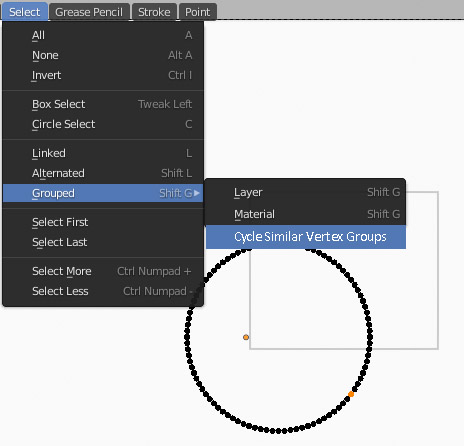
- If there were a function to cycle through vertex groups based on what's currently selected, as is for 'Select Linked', it would make it much easier and quicker to use.
- Also, the 3D-editing version doesn't cycle through groups that share the selected vertices, it selects all groups attached to the selected vertices. Cycling seems more logical because if you wanted to select multiple groups at once, you could create 1 group that includes multiple groups.
<3 GP btw!
0 Comments