
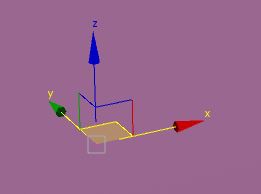
Manipulator Gizmo that let you move around 2 axis at the same time
I'm aware it's already possible to move objects around on two axis at the same time by Shift+click the third axis, but sometimes it can be tedious to work with some angle view as the third axis disapear when it's close to be parallel to the camera. I found the gizmo more efficient in 3DSMax, letting you click between the two axis you want to move around.Thank you
5 Comments
This (and many other things) has been implemented within the [custom manipulators](code.blender.org/2015/09/the-custom-manipulator-project-widget-project/) project. There's also a [design task](developer.blender.org/T47032) for it.
That's really interesting indeed! Thank you
hmm the Shift+x,y, or z shortcut already does this, and its pretty fast. ...
I always press shift+x ou shift+middle mouse because of that and finally it's faster than aiming a precise spot on the screen... On max I also find it's even easier when the "squares" are in the opposite corner. Why not but optionnal please
Shift+x or shift+z is a bit clumsy, but shift+y is really annoying to press quickly on a keyboard :D