
Grease Pencil - Corner Styles
Corners of GP strokes appear as either sharp or beveled, depending on the angle. This behavior is limiting, and also causes flickering when corners switch from being sharp to beveled. I would love instead to have rounded corners, but other users may differ. Hence, users should be able to control how GP corners look (sharp, rounded, beveled, etc). This option could exist in the stroke section of GP materials, as a drop-down. How about also making 'rounded' the default setting :)
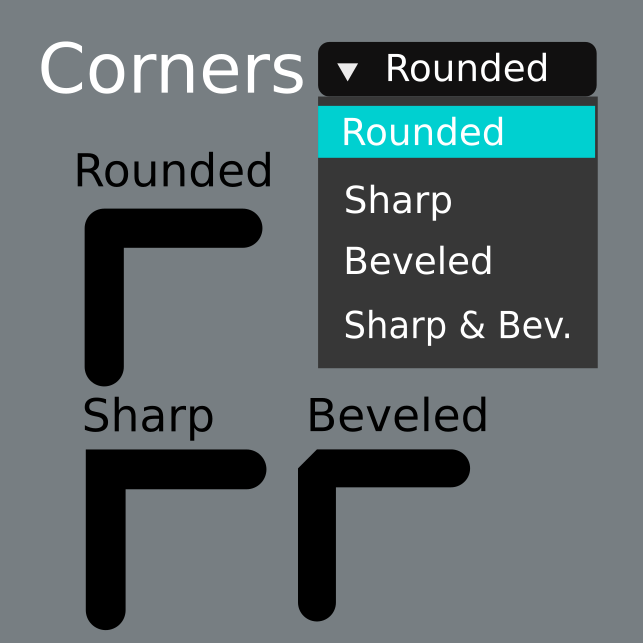
8 Comments
It would be nice if you can specify the corner style per point. So you can have a shape that has a mixture of sharp and rounded corners
Please! :)
please make grease pencil an addon, to some of us can turn it off.
* @othoap * Or you could just not use it?
* @KeyframesAreCool * Lol yea thats kind of silly, turn off Grease Pencil ?
I never use it and it never bothers me, dont see why it should be disabled.
* @Reoxur * I know of a addon that give you the ability to hide panels like grease pencil. I've reclaimed much space in my UI, reducing the about of scrolling needed. Why load anything you don't need? Do you have tools on you work bench you never use?
* @othoap * But I don't understand how is it taking up UI space? I don't even know what panel you speak of or see anything to do with Grease Pencil
* @othoap * Add-ons don't have the same capabilities or performance as something native to blender.