
Scale and spherize etc. things with mirror modifier
in mirror modifier there is a button "adjust edit cage to modifier result". When you click that, it shows also the mirrored edges to a way that makes you think you can edit those. But the button does not effect pivot center for rotation / scaling when you select some edges. I think it should.
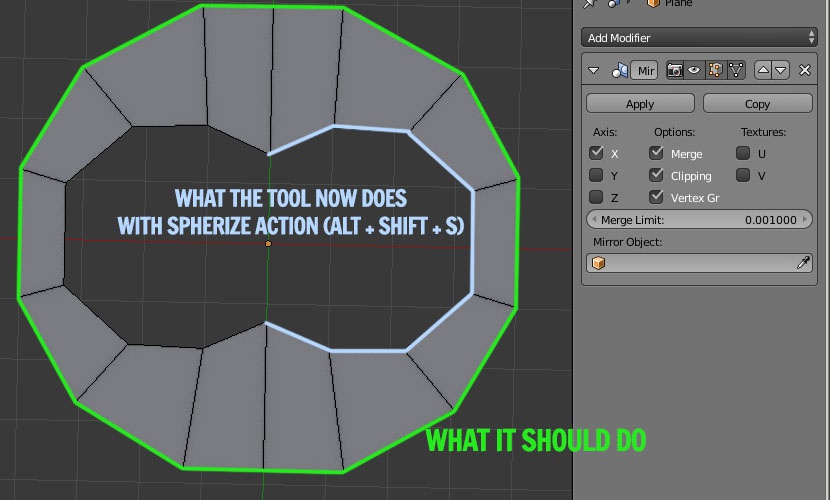
Now when you create a circle that is half mirrored, you should be able with that button activated to press all edges selected ALT + SHIFT + S (spherize) and the result should be perfect circle. But now it does not work like that. It actually spherizes only the half of the mesh, that one that is mirrored to the other half.
See image
2 Comments
For what it's worth, the behavior you're looking for should work just fine if you set the 3D Cursor to the object origin and then set your pivot point to be the 3D Cursor (<kbd>.</kbd> [period] key)
Spherize might be a bit of a special case, but I'm certain that I wouldn't always want the scale operator to behave as you've described. Sometimes I do want to just scale relative to the median of one side of the mesh. I suppose that the same technique could be used (scaling about the 3D Cursor off to one side) though. I guess it comes down to what's the more common use case.