
Jump from key to key from the attribute.
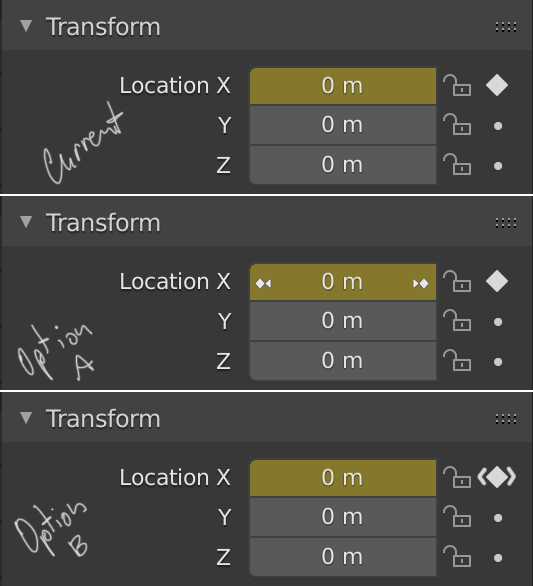
In the same way that by clicking on the circles to the right of the attributes, add keys, I think that once we have the indicative rhombus for animation, we could add a couple of more buttons to jump from key to key of an individual attribute.
Option A should be done when combining the cursor position with a key, since by default little arrows appear to modify the value of the attribute, not the time.
In the right mouse button menu it could also appear, jump to the next or previous key.
4 Comments
Definitely not option A, it will conflict with the current arrows for the value's management.
Option B is something quite common in other softwares with simple keyframes handling.
IMHO it would be even more powerful if using the keyboard shortcut of jump to keyframe while hovering a value with the mouse cursor would make the jump according to the value's keys too.
I find option B to be the best since Davinci Resolve works that way. The arrows are visible only when there's a keyframe in that channel and behind/ahead of the current frame.{attachment Annotation_2020-04-30_204632jpg}
* @Felipe Torrents * Nice catch. The idea is not new but the way of representing it thought so. It is almost impossible to be original. Maco.
Interesting idea. It might be useful.