
Transform manipulators functionality and design update
Everybody knows, that in Blender we can move, scale and rotate things with shortcuts, but also with transform manipulator widget. Now the widget is missing some of it's core feature and I wish to propose of adding that feature into it.
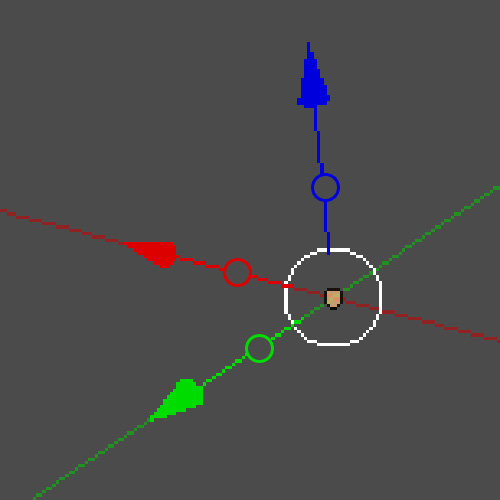
So if you click G (to move object) and shift + Z, you are able to move the object everywhere, expect on the Z axis. But that feature is not designed into the widget, so I made this fast mockup of how I think it would look in the widget.
dropbox.com/s/qjsarpkwl9vgi2r/transform_manipulators.jpg
If you click the circle in any of the axis it will prevent you to do the action on that specific axis.
So, selecting circle on Z (blue) axis, you will do the G + shift + Z -action.
The circle is indicating a "cut point" or something like that. You cut the connection to Z axis by pressing the circle. I believe everybody understands after the first click of what it indicates when they have tested to click it. That same circle should also be present on rotating and scaling manipulators. Otherwise, I think the manipulators should work just like they are working now.
The graphical design of this feature can also be different. This was just my first mockup of how I think it would look like.
4 Comments
There is Custom Manipulator Project (Widget Project) that will be released in 2.8.
And features you requested are already implemented. developer.blender.org/T47032
@Pawel Piotrowski: Oh, that's very interesting! I love that
@Artturi Mäntysaari:
But don't delete this proposal. So someone won't create another topic about same thing.
@Pawel Piotrowski: I also added my moqup there as a comment for them, if someone finds it interesting. :)