
Group tool and improve access to tools and sub tools.
Currently the access to the sub-tools is not clear. In Object Mode by clicking W repeatedly we can access the different selection sub-tools, but it does not work in the other tools. For example S does not give access to the different scaling tools, nor D to the annotation ones.
On the other hand, quick access to the tools is through, (Shift + Space) or (Alt + wait + SomeKeys), which sometimes depending on the mode, is a long list of tools, which I am not used to using.
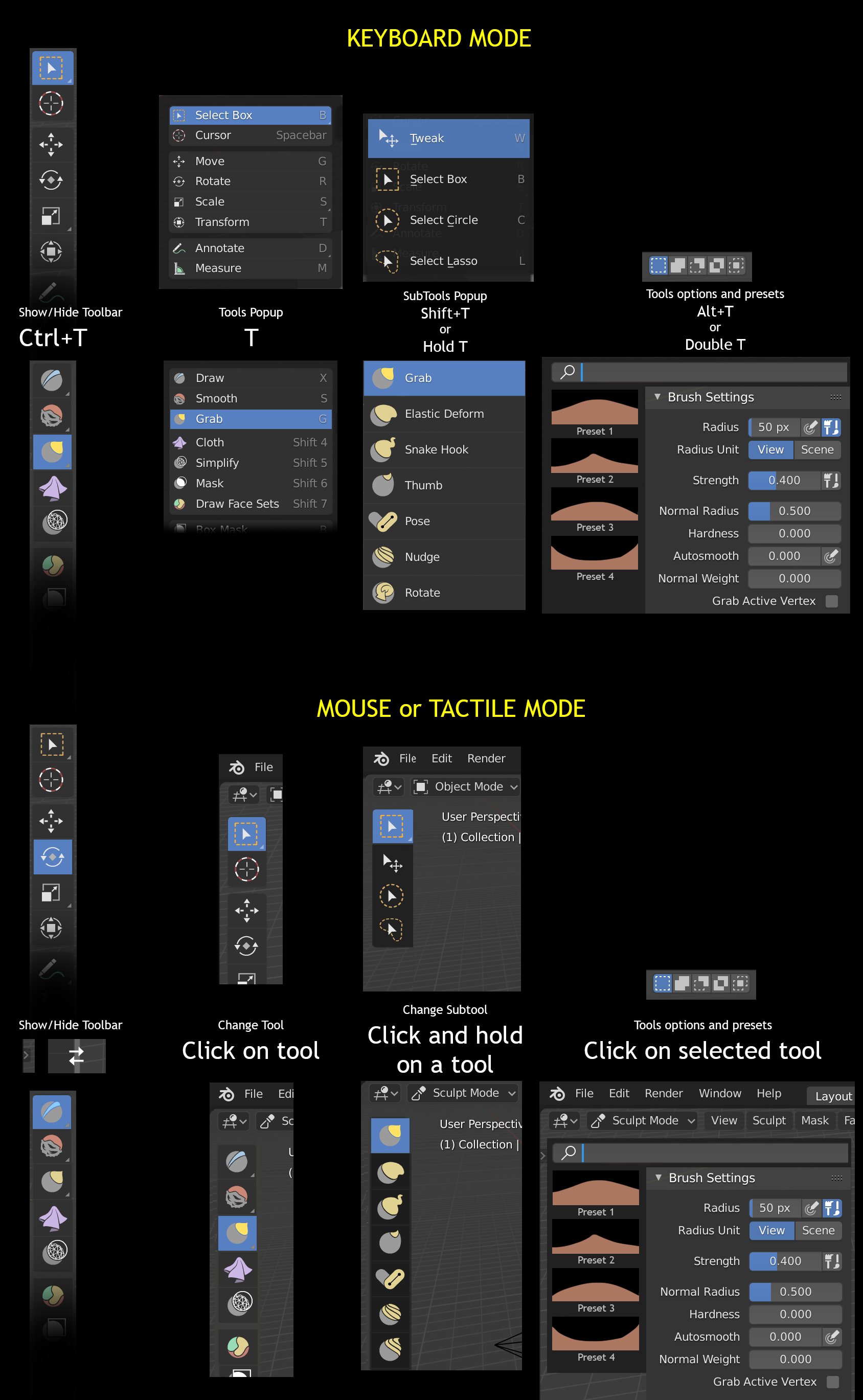
I think we could unify everything on the T key.
(T) to access the tools via a floating panel, centered on the window.
(Ctrl + T) to show and hide the toolbar.
(Shit + T) or (Hold T) to interchange the sub tools of the active tool.
(Alt + T) or (Double T) to select active tool preset and show attributes.
For novices and tablets, it would be accessed through the toolbar on the left panel, the options would be the following:
Click on tool -> select tool.
Click and hold on a tool -> Show and select subtools
Click on actived tool -> Show tool presets and properties
Some modes group tools according to their function, while SculptMode only organizes the mask by sub modes.
Although I think that it should be possible to organize groups of tools according to the task being performed, I also believe that there should be a general tool bar for each mode, with all the tools well grouped and organized. In any case (Q) Quick Favorites should allow organizing the most used tools according to the task.
In sculpture, Pablo Dobarro is adding a lot of tools and he will still add more tools like trimming ones. The toolbar is getting more and more crowded and I think relief, smoothing and mesh stretching brushes could be grouped together in this three categories:
And the rest of categories could be in: Clothing simulation, Mask creation, Creation of face sets, Trims tools, Mesh deformations, Transformation tools ...
On the other hand, I consider that the tool properties should be next to the tools, as in any tablet application, it is much more intuitive.
At least, it could be shown temporarily, and when returning to the 3D view, disappear, leaving the right panel to see the options permanently.
0 Comments