
Pattern selector
The tool would work this way:
-
You select a pattern of faces/edges/vertices. Something like this one or more complex/simple.

-
You define the direction.

-
You select from the tool properties the distance between patterns and the number of iterations. With settings "distance 3, iterations 2, you would have as an end result this. If you leave the iterations to be 0, the pattern selector would continue this pattern as long there is something to be selected.

Where can it be useful? Do models like this (or more complex) without the need of doing manual selections or modifiers.

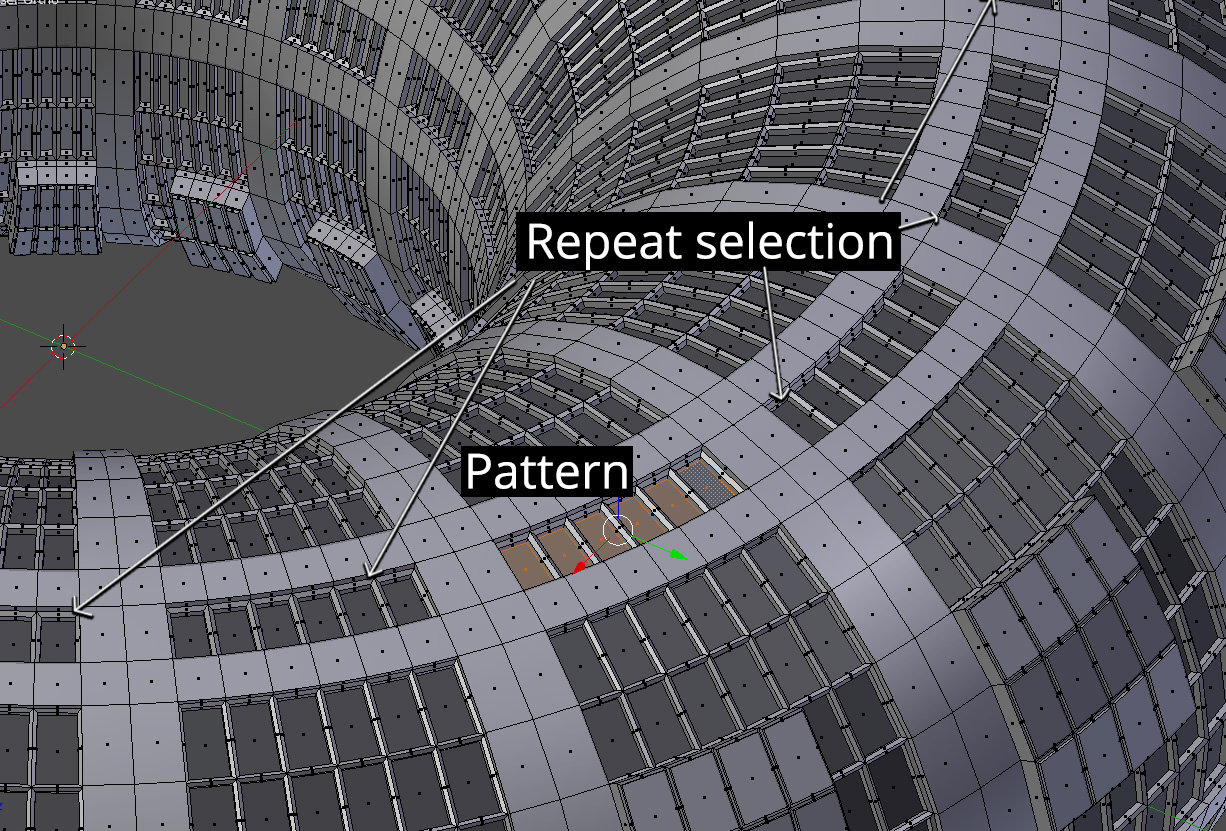
Select all the rows of these windows all around the object using pattern selection:

19 Comments
Update! I have a good idea why this feature is not available in most 3D packages: getting something like this working with more complex mesh topology like in the last 3 images (the torus grid thing) is a nightmare :(
I also think I may have been right with my first assessment on this. It's possible to get this working with smaller selections as an add-on, but when you start working with large selections on complex topology there is a noticeable drop in performance. Reducing that performance hit is not very easy with the limits of Blender's Python API.
Anyways, I've made a "basic" version available that works with meshes like in the first 3 images and those in the GIFs I've posted. Getting it working even on that level took a huge amount of work though (more than all other add-ons I released combined) so I have put it on gumroad for now. If I can get funding to continue development (other than bug fixes): gumroad link
edit: It seems like every time I make a post here about hitting a dead end (or get ready to) I find a solution. Well, I think I finally found a way to get my add-on to work with more complex topology like the torus, will include the fix when I release the next update.
Also, forgot to mention, but there is some additional info on the add-on in this Blender Artists post .
The other reply was deleted, so I'll try to summarize it here. While a feature like this should be possible (and may have even been planned for Blender at one point), it might be quite involved as the code would have to know what to do if supplied broken unusual meshes as Jason van Gumster mentioned earlier. One of the Blender developers made a more basic version of this ("Next Active" and "Previous Active" options) using Python, so this might be doable as an add-on, but performance could become a problem once you get into complex patterns. Having to do a lot of calculations fast doesn't usually favor Python.
For those interested in the Python code for "Next Active", it's found in the directory:
blender\release\scripts\startup\bl_operators\bmesh\find_adjacent.py
Blender also has a somewhat similar path finding option, "Pick Shortest Path", that was coded in C and can be found here:
blender\source\blender\editors\mesh\editmesh_path.c
@nburn_: Thank you for doing this research about it. I wish I had more understanding about programming to continue research myself, but I'm afraid that I am 100% at the mercy of some people who find this interesting enough to check what they can do. So, thank you anyways! :)
@Artturi Mäntysaari: I had some free time and experimented with this idea the last week. It actually does seem like this is doable with just Python. I was able to make this very basic proof of concept after a lot of trial and error:
@Craig Jones: It depends on what you mean by "regular" :)
I found the word "pattern" in "pattern select" acutally has a double meaning when working on my prototype. It's referring not just to the selection being duplicated, but also to the underlying mesh. Technically what my prototype does behind the scenes is to use the existing pattern within the mesh itself to recreate a selection. If there is no pattern to the underlying mesh (or if the mesh pattern changes), the selection cannot be recreated. I suspect most (if not all) pattern select tools work this way.
@nburn_: Oh, that is really nice. Thank you very much for working with this! Yes, I also believe that the mesh has to be repeating to make the selection properly. But honestly, I don't see it as a problem, because the idea of the whole tool I think would be to be able to make big repeating selections, such spaceship windows etc.
I think I have this fully working now. I need to do some more testing and clean up the code a bit, but I was finally able to get this to work with most of my test patterns.
Here's a preview:
@nburn_: That seems to work just fine. Good job! One question: I see you use an active element to control the direction, which I think is a good way to do it. But do we have those properties for the tool so that we could change later the distance or the amount? I made this question because of my programmer friend who said that I need to ask questions like this. :D
@Artturi Mäntysaari: A way to change the amount of repetitions should be possible, I had planned on adding a feature like this for the release version.
I didn't use a direction for finding patterns because I was not getting good results. It only seemed to work on basic repetitive geometry (like Blender's grid mesh type), so I ended up using the last 2 elements in the selection history instead. But now that I've thought about it, a direction based approach might work if it's just for finding the first repetition of the pattern, then the algorithm I came up with for my "last 2 selected elements" approach should work.
I'm not sure what you mean by distance. Distance in terms of, say, the minimum number of edges that separate 2 faces? The problem here is that this is usually going to give you a lot of matches for possible places to put the selection pattern, so you would need a way to narrow those possibilities down to one. Maybe if a direction based approach could be made to work, then a distance option could be added.
edited: changed mind on direction based approach
@nburn_: Thank you again. I don't wanna add any pressure to you about this. That was just one thing that came to my mind after talking with my friend. (he is not a blender guy)
The 2 last elements I bet is a good approach. I can only say from the point of view of a user and it seems to be working.
With the distance, I was thinking a way to change the distance of those last 2 selected faces from each other.
Let's say that I create a complex selection of 15 faces and then start doing a pattern from it. If the object is, for example, a cylinder, the last iteration will end up being in the same place as the original selection. But if I made a mistake in my calculations and the last iteration is not matching with the original one, I would need to do the whole selection of 15 faces again from scratch and try again to make it matching with the cylinder. Unless there is a way to change the distance between iterations. (something similar to what we for example have on checker deselect) I hope this makes sense.
@Artturi Mäntysaari: I think the problem you describe in the last paragraph should not be a huge issue with Blender's undo/redo system. If there was a problem with the distance, it should be possible to roll back to the original selection with an undo action. After the undo you could make the needed changes and then run the add-on again. I have a feature like this in my current prototype that mostly works, just not quite as well as I would like.
* @nburn_ * Looking nice, but it would be better, if the last selected face was tracking first delected face to make pattern search more predictable.
How would this work on non-uniform meshes?
The usecase for this seems small enough that it probably makes to most sense for it to be an add-on.
@Jason van Gumster: I don't know would it work for non-uniform meshes. Probably not, but it does not make the feature worse. It has it's own use cases.
But how I think it would work: Select 2 random faces close each other. (don't need to be neighbors). Press CTRL + SHIFT + NUMPAD +. You will repeat the selection with similar distance.
This new thing I introducted would do the same as the old selecting trick, but it would be able to do that for multiple components at the same time.
I was talking with someone who has been user for other 3d-software for a long time and he told, that making pattern selections in Blender is the only reason why he has not been using blender yet as his main tool. He also told that he knows other people too, who has the same problem. Usually how that kind of selection patterns is done in other programs. (for example Softimage) is that they convert polygons to edges/vertices and by that way they are able to manipulate the selections in a way they need. That is very crucial for hard surface modeling. I think this my feature request would probably fulfill their needs.
@Artturi Mäntysaari: I see your point. However, I do still think that this would be better in an add-on rather than core functionality.
Of course, I could be wrong. This is just my opinion on the matter.
@Jason van Gumster: I would be really happy if there was even an add-on that can do this.
Tho, I still don't get why this is getting downvoted. Would be nice to hear the explanations. :/ Maybe people won't see the practical use cases for this? This can be used to for example things like that one, but with more complex selection patterns: i.imgur.com/m3TkPCp.png
That would be useful of course. What I'd say could be related to option present in Blender is that if Select Next Element operator allowed to include several elements at once to be repeated.
That is, e.g, if 5 vertices are selected in line, then one perpendicular to them, next element will be considered given the last 2 selected vertices. If it were using 5 vertices selected in line as "pattern" and the active vertex selected perpendicular to that line as "direction" then the currently present operator would (at least to some degree) provide the asked behaviour.
This feature would be very good