
Scale entities by reference points
When working with imported CAD or even SVG files, the scale may get a bit wonky and getting the lines in their right dimensions are a PITA to do in Blender. There's no easy way to resize or scale entities by a given length.
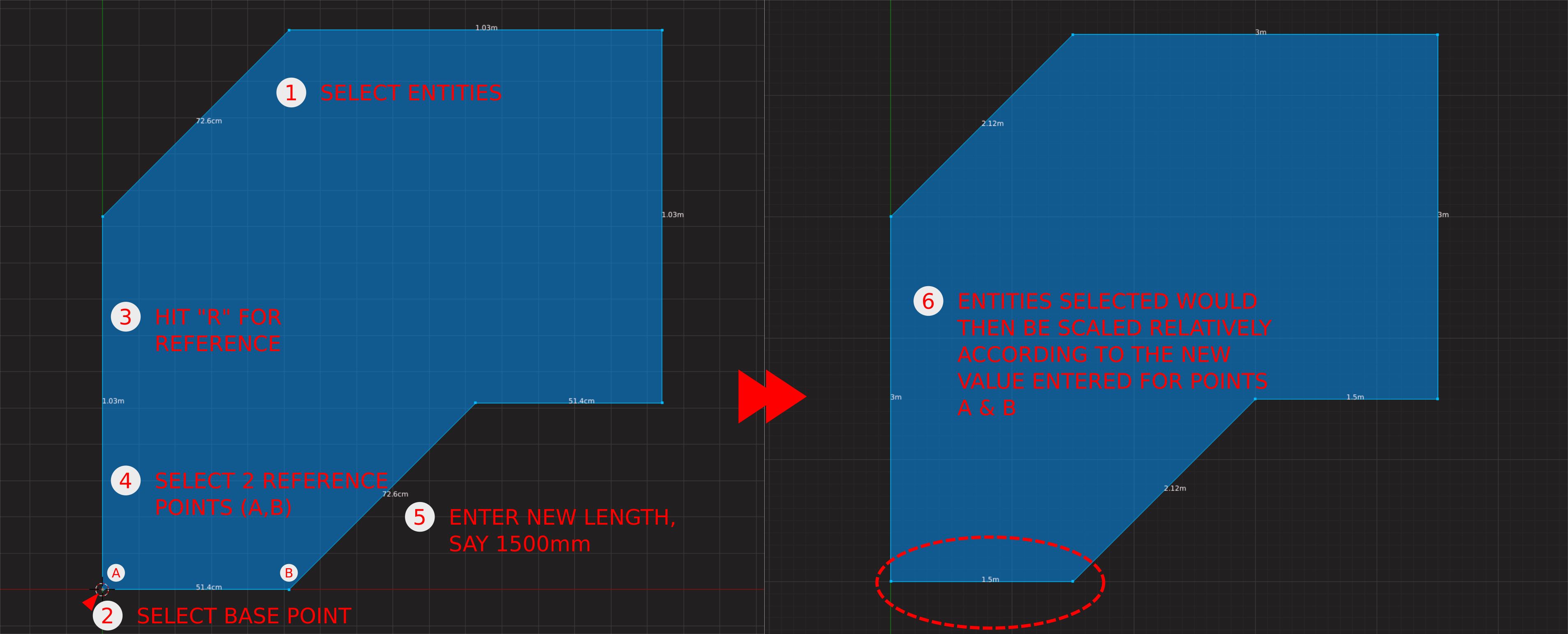
Basically the way to do it in CAD programs is shown in the image.
4 Comments
I get the idea, but I wonder if you could find a way to make the workflow more Blender-like. For instance, you don't need to select a base point if you're using the 3D cursor as a reference. And Blender already has the concept of an active vertex/edge/face. So all you really need to do is have a cleaner way of specifying the length of an active edge by dimension... you do that relative to the position of the 3D cursor and all of the secondarily selected edges will scale to match.
* @Jason van Gumster * You're right, it's almost there. The simplest I can think of is if the operator understood units. I can see it working in edge select mode with with the 3D cursor set up.
Though does this mean this would only then work when you're in edge select mode right?
* @Rey Leonard * Interestingly, transform operators do understand units. It's just that the Scale operator works on a normalized scale. Perhaps there should be a modal toggle while scaling that allows you specify a length rather than a factor. We already have the advanced numerical input capability that's toggled by pressing <kbd>=</kbd> while transforming. Maybe that's the way to go... have users press <kbd>=</kbd><kbd>%</kbd> or some other sequence to push scale numerical input to use units.
* @Jason van Gumster * Huh, TIL about the advanced numerical input. Thank you for the tip! Using that, it's possible to enter a fraction "old length/new length" or vice-versa depending on which is larger to achieve the desired result and it beats just eyeballing it 3000%. But yes, perhaps adding the ability to use units to the Scale operator can be considered since the Translate operator already does this, for consistency.