
Change "Delete active text file"
Not sure if this is the right place to post this but since blender 4.2 when closing a script file in the editor the text has been changed from unlink to delete active text file. This is quite confusing because it makes me think that im actually deleting the file. Please have it reverted or just change it into "Close the file"?
blender 4.2
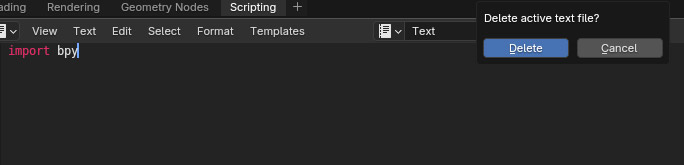
blender 4.1

2 Comments
I think we can agree the terminology used in the popup of the text editor's × button should be accurate and reflect the underlying behavior to avoid confusion. And technically, both Unlink and Delete are accurate, while I'd argue that Close is quite further away and dangerously misleading.
To remind the context in Blender:
In that context:
"Unlink" is technically correct : Clicking × unlinks the text data from the editor, meaning it is no longer associated with the editor but remains in memory. If you save or close Blender without marking the data with a fake user, it will be lost. This is consistent with Blender's general data-block system.
"Delete" is also accurate, but with a different nuance : If not marked with a fake user, that data will eventually be gone forever. However, "delete" could confuse users who assume the data will immediately and permanently disappear, which is incorrect: text data is most often marked with a fake user, and even if the user unmarks them, it still won't be deleted immediately.
"Close" is misleading : "Close" suggests that the data remains safely stored, like closing a document in other software. This term ignores the potential for data loss and fails to communicate the need for user caution to preserve the text data.
Thanks for elaborating. Agree with what you said. With that though, some users are not English speaking users or that tech-savvy of the deeper context hence I assumed something a bit more user-friendly would be better. But I agree and understand completely what you said.