
Theme feedback in Blender 5.0: "Keyframe border selected" color should apply for "Keyframe Object Name's Outline Border" color
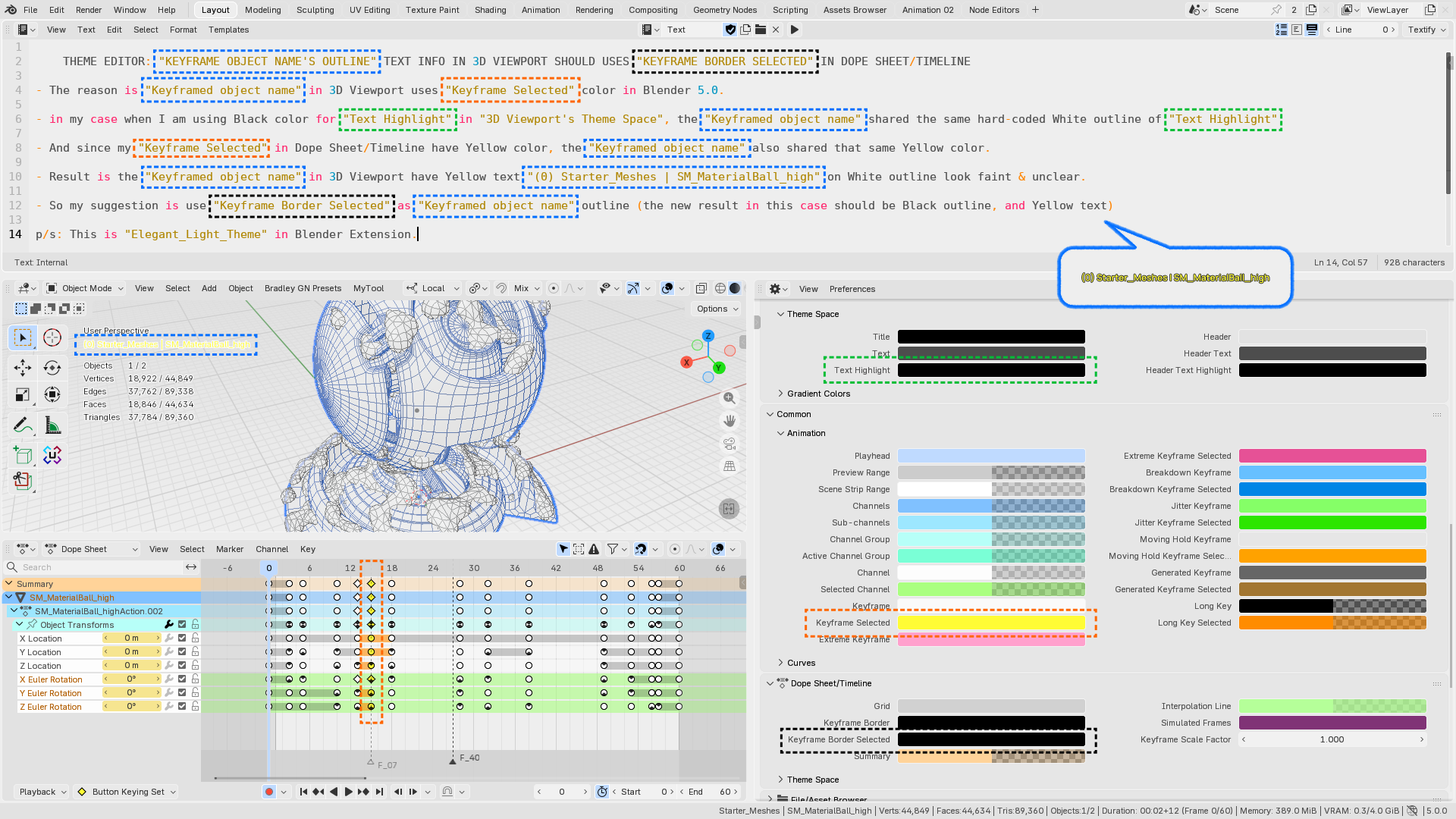
Theme editor: "keyframe object name's outline" text info color in 3d viewport should uses "keyframe border selected" color in dope sheet/timeline
-
The reason is "Keyframed object name" color in 3D Viewport uses "Keyframe Selected" color in Blender 5.0.
-
In my case when I am using Black color for "Text Highlight" in "3D Viewport's Theme Space", the "Keyframed object name" shared the same hard-coded White outline of "Text Highlight"
-
And since my "Keyframe Selected" in Dope Sheet/Timeline have Yellow color, the "Keyframed object name" also shared that same Yellow color .
-
Result is the "Keyframed object name" in 3D Viewport have Yellow text "(0) Starter_Meshes | SM_MaterialBall_high" on White outline look faint & unclear .
-
My suggestion is use "Keyframe Border Selected" color as "Keyframed object name" outline color. The new result in this case should be Black outline, and Yellow text
p/s: This is "Elegant_Light_Theme" in Blender Extension.
0 Comments