
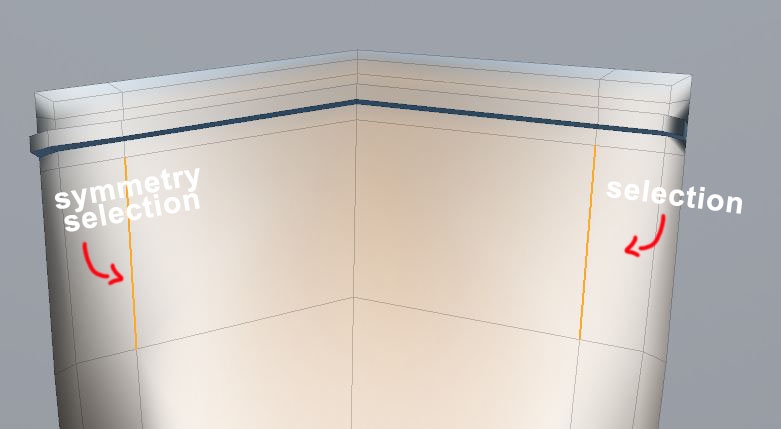
Live Symmetry that actively mirrors your selection
Symmetry that basically takes the selection of one side and mirrors it over continuously and actively. Comparable to the symmetry that already exists in sculpting. Intuitive, quick and prevents having to cut up your models all the time. Especially useful with models where a middle line is unnecessary and disrupts the general flow of the model. That way you do not have to clean up tris caused by it and modelling in general becomes much more clean. Perfect for models that are only partially symmetric. Also, good if you want to do quick edits to a symmetrical model without messing up UVs.
14 Comments
Symmetry should work not only for selection but for editing, like extrude and stuff, just like in Maya I guess. The main problem that I have with thr Mirror modifier is that UV is being copied and overlapped ontop original half. With proper symmetry editing it woud be possible to have UV independent from a modifier.
* @slayerdude93 * Take a look at this proposal for UV unwrapping with mirror modifier.
Good example of such symmetry is maya
* @impacman * Yes, I love blender but it's symmetry and mirror functions are severely outdated.
yep like in modo
So, specifically what feature are you looking for? What about the mirror modifier doesn't does what you're suggesting?
* @Jason van Gumster * The mirror modifier requires the mesh to only contain one side of the object. Mirroring selection for a symmetrical mesh instead is a totally different workflow.
* @Jason van Gumster * To clarify further. For example, take a model that is symmetric but does not have and need a dividing middle line. Sometimes there are models that work better without and forcibly inserting one leads to unnecessary cleanup. Simply put, currently you are punished for creating models that may have nothing wrong with them in general, but just aren't set up to be cut up in such a limiting fashion. Such a limitation goes against the spirit of 3D-Modeling as 3D-Modeling is all about being able to display anything on screen.
Or imagine you have a model that is only partially symmetric and you want to edit the symmetric parts of it symmetrically. Now you wouldn't have to detach and reattach the symmetric parts again. This massively improves iteration and leads to a more intuitive process in general.
* @tobias.grill.1601 *
It's a workflow thing. You start with the modifier, apply it when you're done and use X-mirror after that.
Symmetrical select would be nice, but IMO it's use case is making edits to mostly-finished symmetrical models. I would love symmetry select for UVing, I already use the hotkey to do it manually.
The modifier could be improved, too. Maybe one of the merge options could be to bridge across the center, although I don't think it's very hard to select an edge loop and delete it. Besides, I disagree that models are sometimes better without a symmetrical middle line. The middle line should be there unless you're limiting your poly count.
* @Josephbburg * Yes, I am aware of the workflow. However, that is exactly what is limiting about it. You are forced to use that workflow regardless of model. If I have a model that works best without a dividing line, as that may cause having to clean up, then I still have no way around it. Generally, live symmetry improves iteration massively and it is particularly useful for partial symmetry.
You may view it that way but only because you are so used to working like that. You don't seem to even picture using a quad in the middle of a symmetric model in any way that would otherwise cause tris because of the dividing line. It is quite clearly a massive limitation that any symmetrical model must have a dividing line. Also, with live symmetry I am able to raise the level of detail of a partially-symmetric model uniformly. Without having to cut anything off, reattaching and having to worry about accidentally pushing vertices I then have to manually put back into place. This becomes especially annoying with higher polycounts of course. I think you have not used live symmetry often if you are not aware of what problems it most intuitively solves.
* @tobias.grill.1601 *
I do this sometimes, too, but only when I can't avoid it. It's bad practice. It's easy to fix, though: enter edit mode, select the offending triangles, then
alt-Jto quadrangulate the faces. Maybe the modifier should have an option to automatically quadrangulate border tris. Also, "You don't seem to even picture " this is uncalled-for. Please don't assume things about me. It's not very friendly.This is annoying, but there are at least tools for that- Snap To Symmetry and Symmetrize. The snap-to-symmetry operator is mostly good enough to fix all that, but it can give bad results since it doesn't have a topology symmetry option. I would also like better tools for managing vertex data symmetrically while modelling- making destructive edits to geometry and then fixing symmetry usually ends up messing the vertex colors and groups up.
My workflow is to keep a modelling production file that has all of the symmetrical parts with a mirror modifier and all the assymetrical parts without. Once I'm done editing, I can duplicate everything, apply modifiers, join the meshes and remove doubles. Then I can restore the data from the current rigged model using relations>transfer mesh data
Yes, I have used it often and I'm also aware of the problems it causes. Often when I work in Maya with its live symmetry, I still have to turn it on and off and repeat things on both sides. It also often gets the symmetry wrong with thin faces. It's annoying to use while UVing because it selects symmetrical elements in the UV window, too. It rarely if ever behaves well with bridge edge loops (and wouldn't work at all in Blender without modifications to the operator). The weird behaviour of the pivot is really annoying- often I want to edit a circle of edges all around the model, but the pivot snaps to the center of the side I'm working on, not the center of the symmetrical loop. This would be less of a pain in Blender because of the 3D cursor. And that isn't even considering all the code that has to be added to all the existing tools, bloating everything up. How would it handle make faces, merging vertices, ripping edges, etc.? It's not simple to get the behavior consistent (which is why it's as annoying as it is helpful in Maya).
Something you haven't brought up which is IMO one of the better reasons to implement selection mirroring is editing shape keys. That's the most common situation for things to be only partially symmetrical. I think selection mirroring would be excellent for editing shape keys if it was done well.
Anyways, I think what Blender needs is a few improvements to the mirror modifier, and then a carefully planned selection mirror mode. Both, not one or the other.
* @Josephbburg * Why would it possibly be bad practice? According to what workflow? I am aware of how to clean up tris. I also thought that that was a truthful assumption, as you clearly only thought about one edge loop in the middle and no other situation. That is literally the only logical conclusion anyone could make when you only consider one scenario. That said I am sorry for offending you.
Snap To Symmetry and Symmetrize
Like trying to chug water when there doesn't even have to be a hole.
"Often when I work in Maya with its live symmetry,..."
That has never happened to me and a possibly faulty implementation of this tool in maya does not negate it in any feasible way for blender.
What "thin faces" are you talking about?
"It's annoying to use while UVing..."
That you don't take the second to turn it off is no fault of the program. Also, I found it especially useful for UVing because of it's double selection.
"And that isn't even considering all the code..."
That is a good argument. Albeit the reality is that is has to happen eventually anyhow. Live symmetry clearly the way forward.
The point I was making is that it should be done right or not be done at all. It's a stopgap measure in Maya. Since there's no mirror modifier, they had to do something. But the tool they have doesn't work well.
Perhaps it's my fault for not knowing about a way to change it (there probably is), but the symmetry threshold in Maya is too low, so it often detects symmetry between points that are merely almost in the same location relative to the X-axis. Thus, when many points are clustered together, as in thin faces, Maya often guesses wrong.
Again I don't think you understood my point. Live symmetry is great in the 3D view, but it's not good in the UV window most of the time. It's annoying to turn it on and off all the time (even though it's easy to do).
* @Josephbburg * Well, yes I have certainly occasionally run into a few and very minor problems with it as well. But to me they are easily outweighed by the benefits.
Why would you have to turn it on and off again all the time though? In the typical pipelin modeling-uving you should only have to do it twice. Once to turn it on and once to turn it off for UVing (if your UV-workflow does not benefit from it and of course in general for sorting the UV-islands). I think that's really nitpicking. That said this discussion seems to have become pointless. Regardless, have a nice day.