
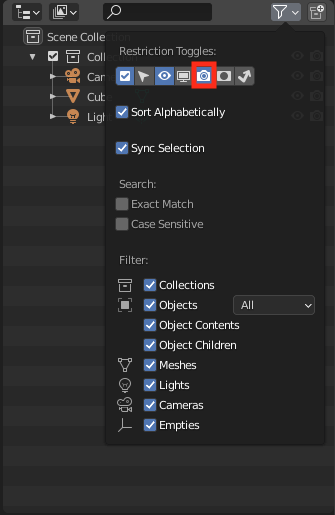
Show "Disable in Renders" by default in "Scene Collection" filters .
I am teaching Blender in multiple Courses. One of the problems a lot of students encounter is, that they assume that hidden objects in the viewport are also hidden in the renderings.
I would recommend having "Disable in Renders" by default active in the "Scene Collection" filters. Up till 2.90.1 it is hidden by default. This way it is possible to see that an object can have multiple states.
15 Comments
In my humble opinion the eye toggle should control both Viewport and Render visibilty and the render toggle should function just as an override option. I just find it more productive that way.
* @Ge Ro * fully agree,, can't count how many times I accidentally rendered hidden objects. In blender test renders are not really done via F12 but just straight in viewport
* @stefan mayr * I get that too and the other way around when visible objects won't render because I needed them hidden in another shot. Dealing with big scenes that are not specificaly organized is realy painfull for quick shots. But, as always, someone already thought to ammend this poor design :) gumroad.com/l/sMNjc
To add a functionality to disable an object completely (similar to the "exclude from view layer" on the collections) would be something that could likely be the best solution for a beginner (as Stanislav mentioned).
This could possibly also be used as a default to select the objects to export (instead of the cumbersome "export selected objects" which is not stored in the file).
Have you considered the possibility of teaching your students about setting up and saving their startup file? In this way anyone can have the "defaults" they need, that is what that capability is for.
* @Stanislav Blinov * Your suggestion is to add even more complexity to fix a problem for beginners who are already struggling with the complexity of blender. For every thing you teach, you have to skip something else, if the time is limited (for me and the students).
Thats the reason i am trying to suggest a change that a lot of beginners are likely to encounter. Currently most students that encounter this problem just delete the objects from the scene if they dont want it to be rendered.
* @rspoerri * Eight years supporting beginners of various backgrounds over two remote support mechanisms and live tutoring tell a different story. Even before those toggles were hidden away by default, when they were always present in the outliner, people routinely "forgot" that the eye only controls viewport visibility, not renderability, and asked why there were objects in their render that weren't supposed to be and vice versa.
Quite simply, the problem is not in ready availability of these toggles (or absence thereof), but in the separation of their function.
What you're suggesting is already possible to achieve with Blender's own functionality without inflicting these changes on every single user for no practical gain. It takes five seconds to set up, and a minute to explain at most . There is no complexity involved. Such preferences are literally what the workspaces and startup file are for, and every user (including your students) should know how to use them.
* @Stanislav Blinov *
So true!
I'm moderator on a forum, and this by far is one of the most frequent questions, no matter before or after 2.8. So much that it's written in big letters in our FAQ, and we wrote a preformatted answer just for that issue.
Though I do think the current set of default restriction toggles isn't the best, because most people who know about them will always change their default startup file and more often than not will at least turn on the render toggle, and then display both hide & disable viewport if not replacing the first by the later.
If the common usage is to have render toggle always enabled, then why not make this the default set and save everyone's time?
* @-L0Lock- * Well, likewise there are lots and lots of people who don't render at all, so for them that toggle is just pointless. This is one of those preferences that just can't be "good" for everyone. Thankfully, there is an option to set it up according to one's needs.
With younger and older students we often get very sidetracked trying explain things that fall under "computer literacy". Having the camera icon available by default would be a huge time saver. I typically only go deep into settings and customization of the UI long after the student has shown a solid understanding of using Blender and a clear desire to go further with it.
You can achieve this by saving a startup file, that has that button enabled (make a video about what your Blender Preferences are). This is not an end solution, but it's a workaround for you since this proposal is very likely to get rejected.
Greetings,
Blender Defender
* @Blender Defender * It's not a workaround. It is the functionality requested in this proposal.
* @Stanislav Blinov * OK, I just wasn't sure about calling it THE requested change, because I'm sure the default state of this property is set somewhere in Blender's Source Code. That's why I just called it "workaround".
I can't just workw without at least the first 4 icons enabled. I can't understand how can the default be that!
Multiple toggle options cluttered the outliner, but if you really need then enable it and save it as a startup file,