
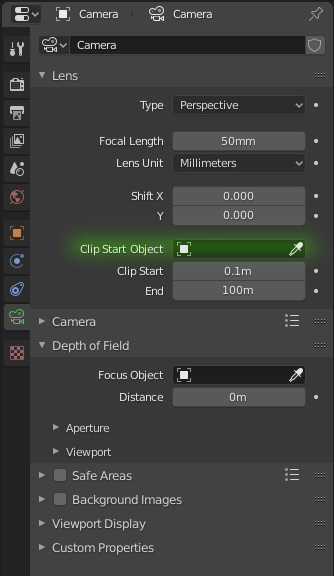
Camera clipping linked to an object
When working with interiors, I often place my camera outside of a room and use a lens size that gives me a nice undistorted perspective. Then I take advantage of the camera clipping feature to "see through the wall". What happens is that when I have to tweak the camera placement, also the clip has to be readjusted, since it blindly follows the camera.
It would be nice if I could bind it to an empty and forget it, as it is for DoF
EDIT:
Turn
"Clip start"
into
"Clip plane shift"
: the value gets added to the "Clip start object" so you won't need to place an empty. You'd just select the wall and add the shift needed to see through. If you don't select any object the camera itself would be the "Clip start object" from where the
shift
is calculated (as it is now).
8 Comments
I think it's possible using drivers
* @-L0Lock- * Indeed. But I also thnk it should be more exposed, afterall its basic concept is very similar to the depth of field, and it could deserve the same attention in the UI
* @ Lsscpp * did you try advanced camera rigs? I suppose they can have such functions.
* @ Vyacheslav * Dunno. Maybe. They probably use drivers anyway.
* @ Lsscpp * absolutely
Nice suggestion. Maybe it would also be nice to have it based on collections or the "bounding box" of the entire scene. That way, you could easily identify when imported objects are stupidly large.
A second thought: what if Clip start was a Clip shift ? I mean, it would be added to the "Clip start object" so you won't need to place an empty only for that. You'd just select the wall and add the shift needed to see through. If you don't select any object the camera itself would be the basis (0) from where the shift is calculated (as it is now)
great suggestion