
Interpolation icons in Dope Sheet
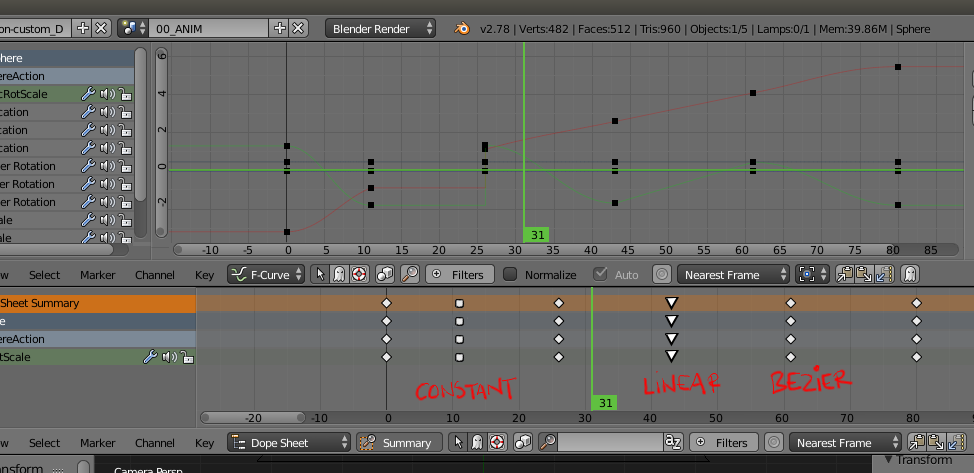
It would be a huge help in animating if we could see the interpolation types for keys in the Dope sheet.
Easiest way would be to use additional icons. We would then have shapes for interpolation and colour for keyframe type (remove the custom shapes from type as they differ very little from standard icon and just use color).
2 Comments
Very cool idea!
Would also love to see something where you can get a sense for the spacing by looking at the dope sheet.. for example, a bouncy ball can have keys that are consistently spaced, so it's a little hard to look at a dope sheet and understand the feel of your animation.
If we had the ability to see a simple spacing chart so you could see if the key has an ease_in, ease_out, or is linear.. that would really help with getting a read for your animation right away!
I like the idea of this :D
And while at that, it'd be great if the condition for drawing the line between points in the dopesheet could be inverted. Because ever since the beginning did I find it absolutely confusing that Blender draws a line between points where NOTHING changes and leaves gaps where change happens. I know this isn't gonna happen because "everyone is used to how it is" and all that meh ._.