
Loop Cut, expose all parameters to properties to Active Tool Settings
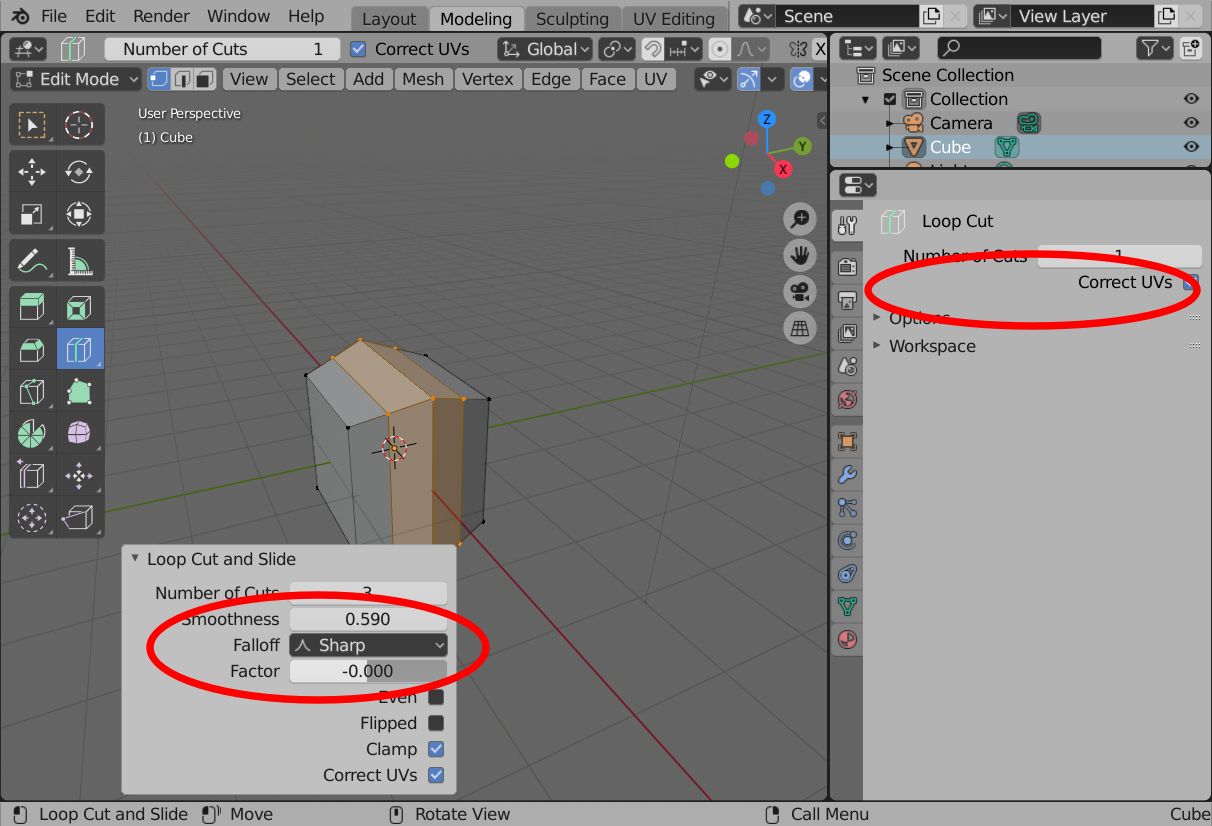
Loop Cut (active tool, edit mode) does expose properties Smoothness//Falloff//Factor and other properties in its interactive prop window. Down left, red circle around.
This tool also has a default setting in Active Tools Setting tab. (Right, another red circle)
In the Tools Settings tab, only two properties are exposed. ( "Number of Cuts" and "Correct UVs" )
My suggestion … Expose all other settings from the interactive prop windows in the Tools Settins tab.
( Smoothness --- Falloff --- Factor --- Even --- Flipped --- Clamp )
2 Comments
That entire "redo" panel needs to vanish from the viewport. developer.blender.org/T57727 and only then we'll be able to make things more intuitive and accessible.
The redo panel is literally the worst part of the tool system in blender.
* @ThinkingPolygons * Hi.
Ok, now I know thing is called 'redo panel'. :D What is the concrete reason you like it to vanish?
My problems with the redo panel …
On the other hand, important attribute tweaks are not hidden in the Active Tool Tab. I think, its rather a strength. New users could use it instantly, without browsing docs or asking others where to find 'interactive properties' of current operator.
Imo, it would be easier to set desired properties once in the Active Tools Settings. Instead of re-adjust it in the redo panel (especially repetive operator calls).