
Use X-Ray only on active/selected object
X-Ray mode is great for selecting and manipulating faces hidden from view. But when enabled, every object on screen is drawn transparant. With complex models, this makes the object you're editing hard to see.
I know there are several ways to selectively hide objects and faces, to focus on a small part of your model. But what is the point of the current all-transparent x-ray mode if it only really works for simple models or very small selections of geometry? And do you really need to see through everything?
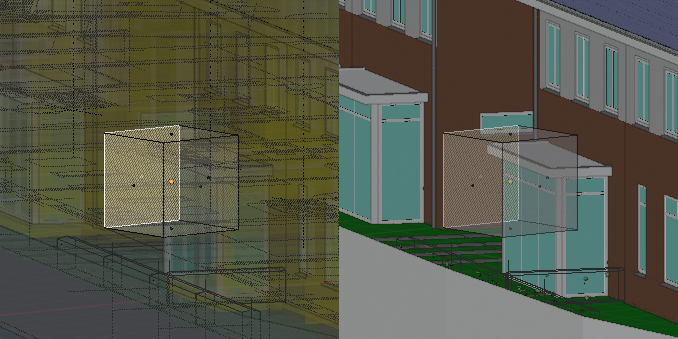
My proposal would be to make x-ray mode draw the selected geometry transparently over the unselected objects drawn solid. You would have an unobstructed view of the selected object, seeing all of its faces. The rest of the scene is still solid, but drawn under the x-rayed object(s).
16 Comments
Discover a way to achieve this:
UPDATE!
"Viewport Shading > Color > Object" 2. Select an object 3. Go to "Properties panel> Object / Viewport Display / Color" and modify the value of the "alpha"
**Note: the image is not a reference for steps
* @Salvador Garcia * I did this youtube.com/watch
* @Salvador Garcia * Thanks, this helped me a lot.
That won't allow selecting hidden vertices, it will only make it transparent
Yeah, it will be great having the chance of being able to set the opacity of the objects also individually. That would help also in cases where you use base objects as references to model or sculpt something over them.
Imagine you have CAD mesh you work with as a reference. this meshes are so dense with vertices. Turning on x-ray turns scene in one big hellish mess. Unable to orient myself in space.....turning on r-xay on selected object only.....would be heaven.
hmm no answer ok well
I did it youtu.be/Cs5GdLfrRe0
It's a bit slower, but you can already set individual draw types for separate objects. Blender currently just doesn't do that automatically for you based on your active selection.
* @Jason van Gumster * I think, there can be addon to allow to add it`s operator to QFav.
* @ Vyacheslav * how about making it programmable for quick favorites or shortcuts? I have seen multiple drop down functions in blender that can be assigned by a shortcut. With these ones though it's not possible.
* @johnpdelacruz26 * yes, it is the best way. No addons, just typical ability
* @johnpdelacruz26 * also i am sure, that advanced pie-menus allow to do it or to program it fast you can copy operator right fron info-stack {attachment 5964512jpg}
* @ Vyacheslav * Are these scripts? I am not too familiar with scripts yet. I am still in the beginner section in my python tutorials.
* @johnpdelacruz26 * this is operators, that was executed, when you press something. They are named clear and easy now. Also there is python console with autocomplete. So basic blender python is very easy to make macros like «do simple operator, do another, do another». I am highly recommend you to learn it a little to be able make simple macros for routines.
* @ Vyacheslav * Thanks. I will try to look into it.