
Browse button to locate missing linked files in the outliner
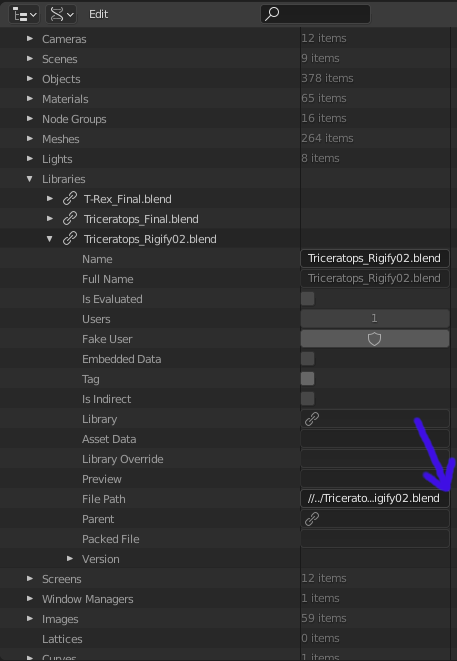
I often have students misplace linked character files, or move a scene file not realizing that it can't find the relative pathway back to a linked asset from its new location. Cleaning up these situations would be easier with a "browse" button inside of Outliner>Data API>Libraries>FilePath as shown in the screenshot.
3 Comments
The Data API view is meant mainly for debugging and as a low level view of the .blend file data, not meant for general editing if you don't know what you're doing. I don't recommend editing from there especially library related stuff.
Relocating libraries must be done via the
Relocateoperator, available on right-click of a library path while in Blender File view in the Outliner. Using the operator takes care of setting new paths recursively and fixing possible issues along the way.{attachment Screenshot_from_2021-05-19_14-26-44png}
* @Pablo Vazquez * Thank you! I was hoping there was a better way to do that, but my google searches had all failed to turn that up. Thanks for taking the time.
* @Pablo Vazquez * ? is this a bug: When you use "find missing files" it reports files that are packed into the blend file as missing. When you use "report missing files" it does not do this.