
Subdivision modifier Apply works awkward
Hi guys! I have a problem. I made a bug report, but now I think maybe this is not a bug but a feature:
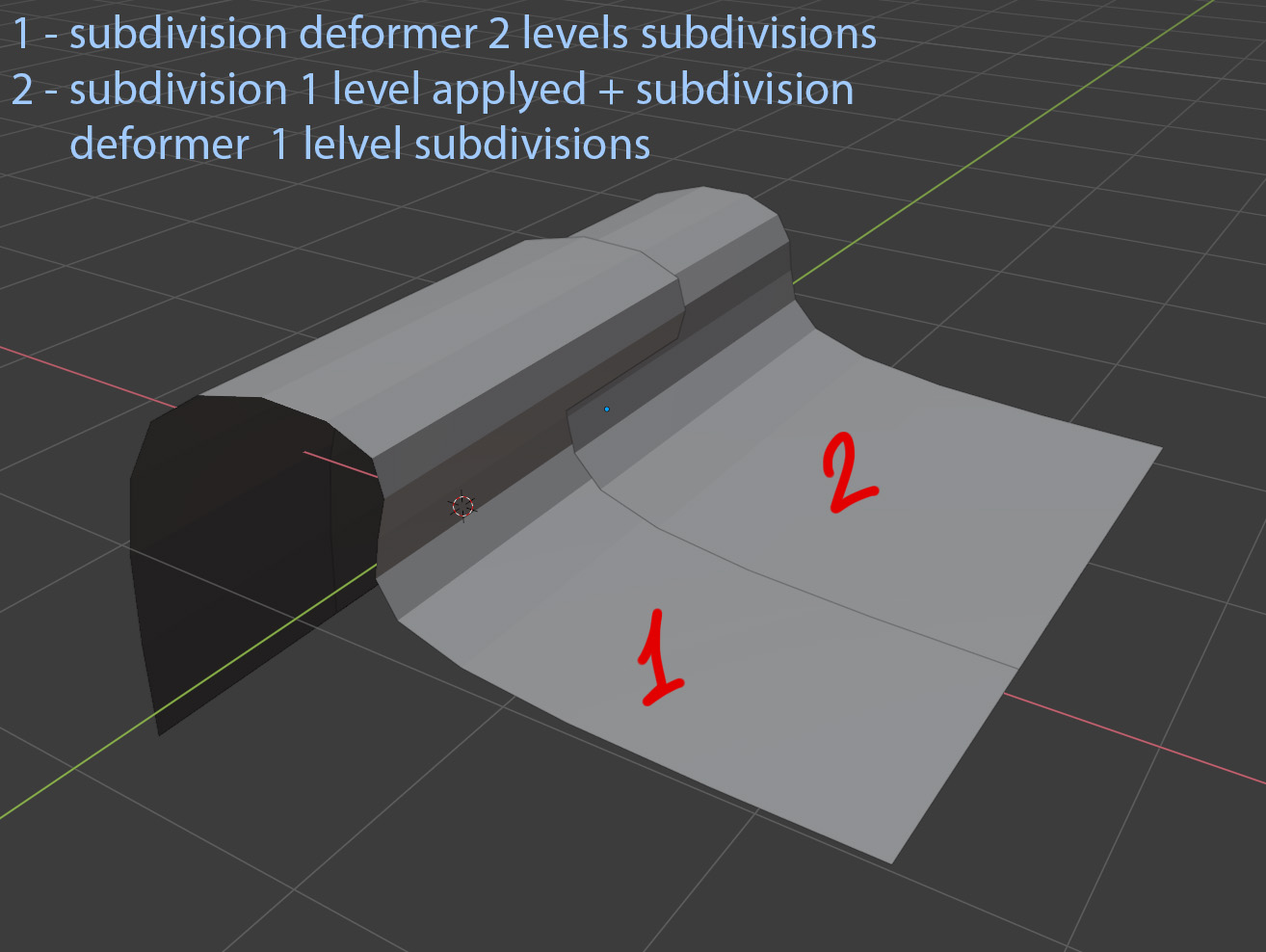
when I apply the subdivision deformer, I expect that the deformed geometry will look the same as before. If I apply one level of subdivision deformer, then add subdivision deformer for another one level, geometry doesn't look like if I add just deformer with two levels of subdivisions.
This is awkward because one of the common pipelines looks like: make a base shape > subdivide > add mid-level detail >subdivide > add high-level detail. But before subdivision and after I get two different shapes.
Do you think this behavior should be fixed, or is there a workaround?
14 Comments
Just tried this in 2.79 and the result seems consistent, while 2.8x has the problem you described here. Devtalk forums would be a better place to discuss this.
Side view comparision between 2.79 and 2.8x
Show us your modifier stack. There's not much point in discussing this if we can't see your workflow.
* @Josephbburg * Add a subdivision surface to an object with 2 levels, duplicate the object reduce a level, apply it and add another subdivision surface with 1 level, the result between the mesh is different which isnt the expected behavior. the quality parameter doesn't affect it btw imgur.com/8maz86G.mp4
Doing the same in 2.79 with the same object (copy pasted from 2.8) gives the expected results . imgur.com/XjquRwx.mp4
* @rc12 * Thanks, I didn't understand that from the post! I don't think this is a bug. Blender used to have its own Catmull-Clark algorithm that apparently worked iteratively. Now it uses OpenSubdiv, which snaps the mesh to the limit surface no matter what level the subdivision is set at. So changing the shape of the mesh will change the limit surface -- it won't work iteratively. This is expected behaviour.
{attachment apply2JPG}
* @verderblich * It looks like you want the behavior of splines or nurbs for the subdivision modifier? For fixed mesh geometry, the interpolation of the subdivision is parametrized by the original topology of the mesh, adding edgeloops where necessary as well as by the "crease" value of edges. Since most modeling tools are based on polygons, it is straitforward to use subdivision to add details. Imagine having to do all your modeling using nurbs instead? Good info here: graphics.pixar.com/opensubdiv/docs/intro.html
* @Bruno * Not at all
* @Bruno * On the screenshot same example but in Maya. Softimage does the same. It's all polygonal meshes.
yep, this is a major issue, the new subdiv modifier uses open subdiv from pixar, but it looks like they confused subdivision with tassellation, lol. So now we have a non-ideal behavior. If you don't mind, help me out to push this issue on the devtalk forum here:
devtalk.blender.org/t/subdivision-behaviour-is-different-than-in-any-other-software-causing-compatibility-issues/13032/33
Sounds to me that you are doing manually what the multiresolution modifier does automatically?
* @Ivo * For production I need to export my models. Maya doesn't have the multiresolution modifier. In blender multiresolution is currently broken. So what is your point?
I'm not sure what's ideal behavior. I can see how this might be an issue for modelling. At the same time, I suspect that any code fix might impact people using live subdivision poorly, and that use of the quality parameter might address this issue anyways.
Since you're looking for a workaround, one obvious one would be to model with multiple copies of a single iteration subdivision instead of using a single copy of a multi-iteration modifier. Apply each in turn as needed.
* @vasiln * How is multiple copies can help with that? Since they all have different shapes at different levels of real subdivision.
what is the use of such behavior? what problems can it create?
* @verderblich * It could impact performance, and obviously, it will change the shape in a way that they don't expect. People using multiple levels of live subdivision expect subdivision to create the existing look.
If you model with multiple copies of a subdiv modifier, all at level 1, then applying each sequentially will not change the appearance of the model. Try it out.