
Blender Keymap
-
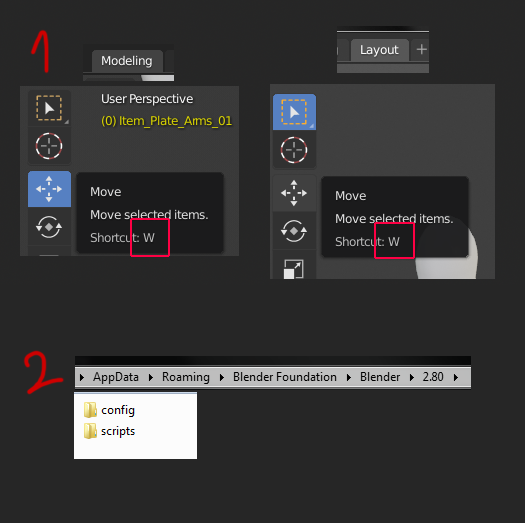
Some of your hotkeys aren't really saved in the Blender Keymap changes you make like the ones shown in the first part of the image - the ones for the Move, Rotate, etc. actual moving tool. Changing these from the keymap won't have an effect but changing them in the layouts will. Also you have to change them for Modelling and Layout, even if it's for the same action like Move, they use separate keys. Also, if you missclick while changing these keys and click Left Click or any mouse button you will not be able to change them again since Blender prevents you from doing that and the only way to reset those
-
is if you delete all your AppData\Roaming\Blender Foundation\Blender\2.80 user preferences, where secret hotkeys like these are saved.
Also, I don't think it's possible to change the X Y Z lock axis movement keys since they cannot be found in the Blender Keymap. Maybe they are there and I just couldn't find them but honestly there was one key, the "Focus" (view3d.view_selected) for which I had to create a key because it was not there to be changed in the Keymap (a friend told me the command since I am quite new to Blender). Perhaps that is as intended but a Ctrl+F searchable link to a list site with all known keys AND more importantly commands (I don't know what you call these, ex.: view3d.view_selected) could really help in knowing what new ones you have to create.
2 Comments
You seem to have described a problem, but unless I'm mistaken, I didn't see any clear proposal for a solution. What is the specific suggestion that you're making?
About XYZ axis youtube.com/watch This
Csolution cause small problem - in vertex/edge slide operatorCtoggle stop work, but holdingAltstill working.If you want to remap
XYZconstraints - be careful.