
Selecting the line in geonode to allow it's deletion/removal
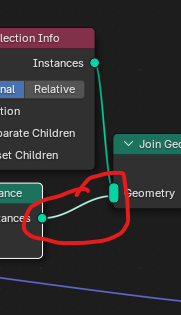 Been using geonode for many months and there's one thing that's always a struggle and that is removing a line out of an array input of a node. Especially if there are many array inputs.
I believe it would be easier if I can just select the line itself and press delete.
Another option is maybe to click and drag near the end of that line could also result of removing the output.
Been using geonode for many months and there's one thing that's always a struggle and that is removing a line out of an array input of a node. Especially if there are many array inputs.
I believe it would be easier if I can just select the line itself and press delete.
Another option is maybe to click and drag near the end of that line could also result of removing the output.
4 Comments
Or do as everybody has been doing for years: use the Node Wrangler addon. With this, you can simply ⎈ Ctrl drag Right 🖱️ to cut any noodles you want in one stroke.
You should try using the node tools addon; if offers nearly that feature.
I disagree with those that suggest to use an addon for this. One of the great things about Blender is that certain shortcuts and operations work everywhere. The S key can scale all kinds of things... objects, keyframes, curve handles, etc.
Yet at the same time... Click an object and press delete to delete it. Click a node and press delete to delete it. Click a keyframe and press delete to delete it. Click a noodle and... nothing.
Thanks guys. I totally forgot about those shortcuts and mindset. I guess then the situation of wanting to click and drag it to somewhere else out of the array input is still a struggle. But I can live with this as long as the line isn't too far away.