
Easier control over World/Environment outputs
Currently the world output is just one slot. It's there and lights, reflects, refracts and shows in anything or not. The only way to counter this is to render with transparent background and set up the different passes in different places in Blender.
Here's how Modo sets up environments as a comparison:

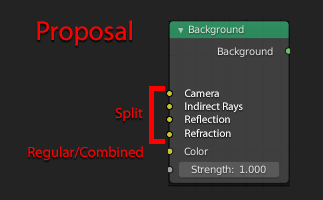
The influence of the environment is split up into the four major parts:
- visible to camera
- visible to indirect rays (lighting)
- reflections in the objects
- refractions
On one hand that's nice because you have more control over what is being rendered in the final image. On the other hand you still havew to set up different environments if you want to split the influences or HDRIs.
Blender could do this much better (and easier) in a node setup, IMO:

This would also counter the problem in the rendred viewport. By default you you have to work either with the full blown HDRI background visible or have 'film' settings set to transparent. and still have no quick and easy control over the background color in the rendered viewport.
Splitting the main inputs of the world into different categories could easily set up the HDRI for reflection and lighting while keeping the background set to a crisper image, simply a dark grey color, or something entirely different.
8 Comments
Isn't this already possible using the Light Paths node?
* @Jason van Gumster * Yes it is
* @ Lsscpp * under Cycles yes
* @Jason van Gumster * You do have to noodle a lot of nodes together if you want a more complex setup, don't you?
I mean - since we do have the node already it probably won't be changed now but with my proposal you could feed all the things you need at once into the now. With the Light Paths node you need to create a mask split graph for every channel you want to use or exclude, if I understood that correctly, no?
* @motionblur.of.doom * Re-reading your proposal, I'm thinking that it's possible that you've just redistributed the complexity. The node setup for exclusions would still be complex regardless.
The other issue is that it's not clear that there's a mutually exclusive relationship between your "split" sockets and the combined color socket. You would need a toggle to switch between those two possibilities.
you can create your own world. watch this page there is good info meshlogic.github.io/posts/blender/rendering/nodes-correct-hdri/
* @zgorg2004 * That is completely the other way round than I had expected. Thanks for the link. Guess I'll have to reconsider Blender's node logic.
* @alexander * a video I did youtube.com/watch