
Selecting Grease pencil objects by the dope sheet
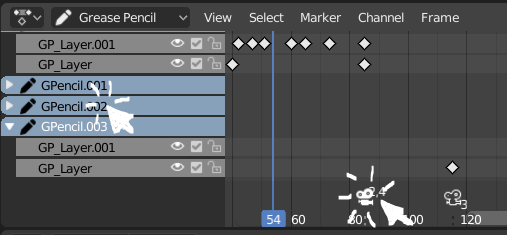
To switch between different grease pencil objects, I need to go in object mode, try to select the object I want (which is often not visible in camera view, so I need to leave the camera view), then switch again to draw mode.
It is slow and quite frustrating since in the dope sheet I see the object I want. Also I can switch between layers by clicking on them, so naturally I want to click on my different objects too.
So it would be very convenient to be able to enter the draw mode of the different GP objects just by clicking their name in the dope sheet.
I hope this doesn't break some basic concepts.
(I also thought it could be convenient for cameras too. They could be selected by the dope sheet markers while in object mode)
6 Comments
holy shit this suggestion is fire.
you could cheat it at the moment with a modal operator. I've been thinking of making one...because it's really annoying when you have more than one GP to be constantly switching from one object to the other
* @okuma_10 * interesting, I have no idea what it is, I might research
* @Romain Guimbal * A modal operator is an operator that runs continuously as opposed to one that runs only once then finishes its job.
Examples of regular operators: Set Origin, Duplicate Object, Delete Object, etc
Examples of modal operators: Move / rotate / scale object, Knife tool, Bevel, Inset, etc. They all run continuously and allow for user interaction.
I think * @okuma_10 * wants to use a modal operator that always runs in the background and checks if you pressed on the dopesheet layer, which when returns true, could select the object associated with it automatically for you.
I'm still new to the Blender API myself so sorry if I wasn't 100% correct.
* @MizManFryingP *
Pretty much. Since GP layers hold info about which GP object they belong.So if you do it with a modal operator,you would have to loop trough all GP objects->their layers and find which layer has it's 'is selected' tag turned on. Once that happens extract the object name from the layer - >Loop trough all GP objects, -> find the object with that name-> turn it's 'is selected' state on and off for the rest - > then turn on draw mode and kill the operator. At least...that's how I was envisioning it.
By the way...since we are on the topic...here are some scripts that I did for GP github.com/okuma10/Grease-Nudge
Blender Artists Threads:
blenderartists.org/t/small-script-for-rendering-grease-pencil-keyframes-not-every-frame/1165990
blenderartists.org/t/grease-pencil-onion-skin-toggle-from-dope-sheet/1163072
Oh please, yes!