
Clearer tooltips for Viewport Shading modes
The Viewport Shading tooltips are wordy, and the essential information is buried:
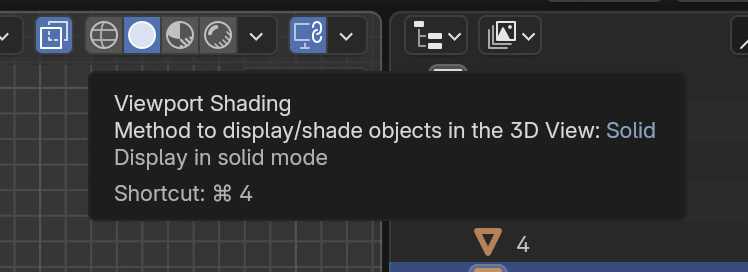
Many new Blender users assume that "Viewport Shading" is the name of the current shading mode, and they'll say, "I'm in Viewport Shading mode and I'm seeing blah blah blah..."
A better tooltip design would be:
Viewport Shading: [mode]
Shortcut: [shortcut]
1 Comment
Agree!
I would also like to see more descriptive description of the mode itself. Saying that solid mode displays in solid mode doesn't really help.
Edit:
It's in progress: #137571 - UI: Enum Tooltip Item Order - blender - Blender Projects
And I also made a PR for more descriptive shading modes tooltips that's already merged :D #137699 - UI: Viewport Shading Modes Tooltips More Descriptive - blender - Blender Projects