
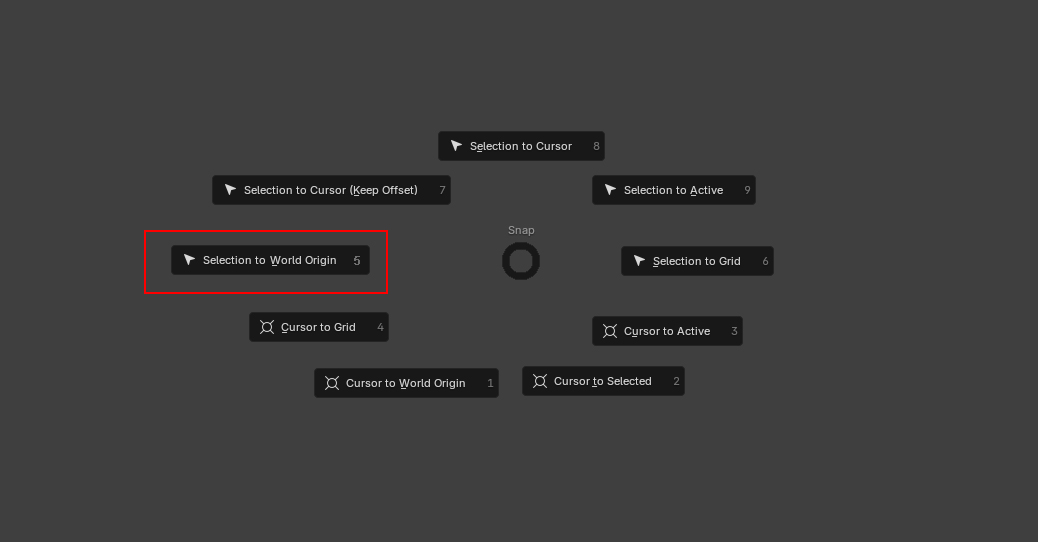
Snap Selection to World Origin
So, Shift+S lets one SNAP! One can snap the Cursor and one can snap the Selection. Very useful!
In more detail: one can snap the Selection to the Cursor (and with Offset if you like), to Active and to Grid. Futhermore, one can snap the Cursor to Selected, to Active, to Grid.... AND to World Origin!
So, one quick question? Why can't one snap the Selection to World Origin???
When you want to snap a Selection to the World Origin you first have to snap the Cursor to World Origin and then Selection to the Cursor.
You might say: well, that's just one more step, not that bad, is it?
I say: not if you have the Cursor placed at a specific spot in the scene and you want to snap a Selection to the World Origin at the same time. Two steps quickly become many more. Too many!
So, I propose another entry in the Shift+S pie menu: 'Selection to World Origin'. And you wouldn't believe it, there is even a number free for that: it is the 5.
Very simple, more coherent and rather useful!
1 Comment
It's probably not an option in that menu because the Operator Clear Location under the menu Object ⟩ Clear or shortcut ⎇ Alt G already resets the location of the selection to zero, aka the world origin:
Though if we find out that users find it more convenient and expected to find it in the *Snap * menu, maybe it should also be present there as well.