
Nvidia's NTC (Neural Texture Compression) integration
I came across this SDK developed by Alexey Panteleev, a developer at NVIDIA: github.com/NVIDIA-RTX/RTXNTC
In short, quoting the project’s original description, “Neural Texture Compression (NTC) is an algorithm designed to compress all PBR textures used for a single material together”.
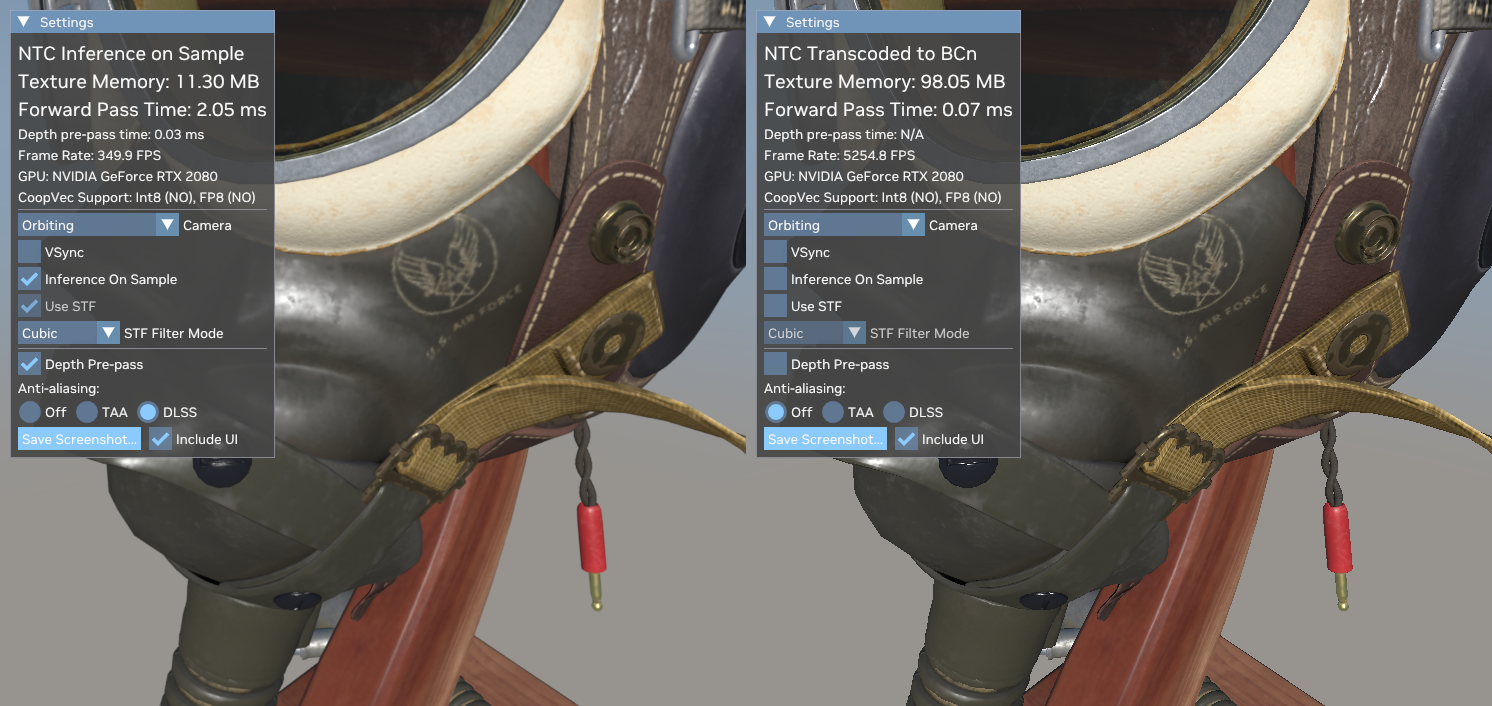
Example provided by Mario Ambrogetti from Blender’s Italian community, who compiled the source and showcased the included Vulkan demo. Picture on the left shows a result with NTC using around 11 MB, vs the almost 100 MB on the right.
The results are impressive, and while I don’t personally have any development experience in this field, I casually came across the SDK and I figured it’s worth pointing out that integrating the algorithm in the rendering pipeline might save a lot of VRAM, while still preserving a quality close to the uncompressed textures.
Perhaps this could be an optional toggle in the rendering settings, or it could be integrated at the material level, in order to give the user a more granular control.
Saying whether the integration is feasible is far beyond my capabilities, but I hope someone will seriously take it into consideration and evaluate if it’s worth the effort.
On paper this algorithm and SDK seem great, and I didn’t want to miss the opportunity to propose it in the effort to improve Blender.
9 Comments
I also see a very clearly blurry result on the left.
Is this a FOSS technology with a compatible license to Blender's ?
Is it usable only on Nvidia GPUs or any GPUs (and which generation coverage) ?
Is it a fully fledged technology or a wip?
Will it be properly maintained by Nvidia for the upcoming decade ?
Is this a technology for either online or offline rendering, or both ?
The README is quite comprehensive, the only doubt I have is with the license, this would have to be double checked. However, everything uses local features of the GPU. It's currently in beta. It works on AMD and ARC gpus too, but this is probably better on Nvidia, which is what you're likely to run for Blender anyways. Everything is in the README upfront, including details on licensing.
For every other question I would directly contact the developer at the email provided, he's the most qualified person for answering any detail on the technical side.
As for the texture being blurry, the point is that you can afford to lose some detail in certain assets, if you can optionally toggle this compression algorithm at the material level. Far more comfortable than having to generate all the lower res textures potentially for hundreds of assets (which would have to be stored somewhere anyways) and load them every time based on how you use the asset. One could simply have a photogrammetry asset (for instance) and toggle the compression algorithm on the objects that need it.
There's a ton of benefits in that, especially with studios that really have to handle a ton of assets. Saves space and time. Sure you could argue you can generate all the data you need for each asset with some automation, but most people working in studios struggle with automation and would need to outsource dev work, but those same studios spend a lot on GPUs that have dedicated hardware for things like this. It's hard to really say what's best. But if this is easy to implement (that I can't genuinely tell) and everything is in check with the licensing, then I see at super useful. Personally I'd use a feature like this myself.
Sure, for assets this makes sense. Having baked textures for PBR like this and then having Blender read it and render it is a useful feature. Sort of like jpeg compression but you dont see recognizable artifacts.
Im not sure if this could be good idea to train and retrain model every time you make simple edit (paint) on one texture.
um no... the one on the left is blurry because anti-aliasing is turned on, we can see it right in the picture.
do people just not notice things anymore?
Ive seen similar demo for this. Technology is good, support is slim. Nvidia 16XX/20XX and up.
Blender being software for creation and this being "baking" technology it might not be all that useful. I rarely run in to memory issues even on 8GB card.
This could become useful for scenes where you have a lot of photogametry assets because such meshes have a lot of geometry and textures that arent procedural at all. Weather this could help with that or not Im not sure.
I know plenty of users, especially those working in studios, that can really benefit from saving vram in every possible way, photogrammetry assets are becoming quite common.
Not sure about the baking aspect, in all fairness.
it would definitely be good to see options for texture compression in Blender as something you can 'apply' to images (maybe it stores an unaltered version in the .blend file/library to enusure its non-destructive). Theres been a few instances I've downloaded models or environments only to find they use insane amounts of VRAM, and it'd be good to be able to compress inside of Blender instead of needing to use something like FileOptimizer
Does it require an Nvidia GPU? If yes, then how would blender support this on other hardware?
AMD is working on their version.
Also, it does not have to be supported everywhere, uncompressed can be fallback as it is right now. Or standard BCn compressing (that is also not implemented in Blender), that by the way they are comparing against, so result is 6 times more save in comparison to uncompressed and are as below: