
Select More with successive clicks
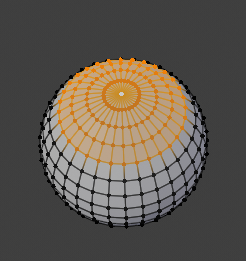
After you select a vertex/edge/face in edit mode, if you click again without moving the mouse cursor, nothing happens. What if you could Select More using successive clicks (not only the current Ctrl Numpad + shortcut)?

I know that this could be achieved now by customizing the keymap for Mesh > Select More, but it would be nice to have this by default.
p.s. I'm using right click option for selection in Blender.
9 Comments
Ctrl+Wheel works best for me.
@Ge Ro:
Great idea. Thanks!
This is an easy thing to bind to a hotkey.. and would be an awful "default" imo, since two clicks is basically a double click (depending on what your double-click speed is set to) and in most 3D software double click selects linked faces/verts/whatever.
@testure: I don't know how it is in other 3D tools, but here does nothing in edit mode. Regarding the wait time between clicks, it think this can be set in code and a value anywhere between 1500-2000ms is safe enough to prevent loosing your selection.
I'd prefer if clicking on the same vert in edit mode switched the selection to another vert that is in the same place and not do this. Plus it is easy for blender to mis-identify your clicks and you accidentally click some unwanted vert or the same vert again. For me this change would add more frustration because in those situations it would increase the selection which means my complex selection process is ruined and I need to start from scratch.
This could work better as content sensitive buttons that appear when you select something. Like + and - buttons. So you don't need to remember the hotkeys. For me this click-increase-selection would cause lots of issues though.
@o7216059: As I was answering to Udjani, I think this is about working style. SUPPOSING that this proposal would be ever considered, Blender has and proved many times its good habit of not implementing something set in stone for everybody ... Anyway, until then, discussing this seems to be a good exercise of bringing various point of views on table.
Take a look a this, seems to be a more fluid way of doing it. blender.community/c/rightclickselect/V5cbbc/
@Udjani: Indeed, that's an excellent suggestion, too, but I wanted to keep the wheel for navigation like in 2.79. Not sure though if they will add back that navigation style in 2.80, which means that will be room for the other proposal. Anyway, it's all about working style, I guess...
Excellent suggestion. I experimented with this myself, and I managed to actually assign both select more and less to L click drag. I used the "tweak" command and then made it so that each of them were assigned to either south (select more) and north (select less). This way you take up less hotkey space and it works on an intuitive level since you can easily remember which direction does which command.