
.blend - Allow "Packing" of video seqences and or movies
"Image 'xxxxx.png' skipped, packing movies or image sequences not supported"
I've recently needed to move Blender projects that contain many animated textures using Image Sequence or Movie as scene dependencies.
My usual "go to" when moving .blend projects to a new location is to "Pack" the dependencies into the .blend file structure. I noticed recently however that this is not possible when using Image Sequences or Movies.
This also disrupts my ability to "Pack" and then "UnPack" resources to quickly collect and repath scene dependencies.
This is also a potential pain point when using a render farm. The best case scenario is to pack the whole .blend file and upload to chosen service. However with image seqences or movies, a workaround is required.
When using Render engines other than Cycles this is mitigated by scene containers such as .vrscene for vRay or .orbx for Octane. With Cycles though we are largely reliant on the .blend file being fully portable.
Edit:
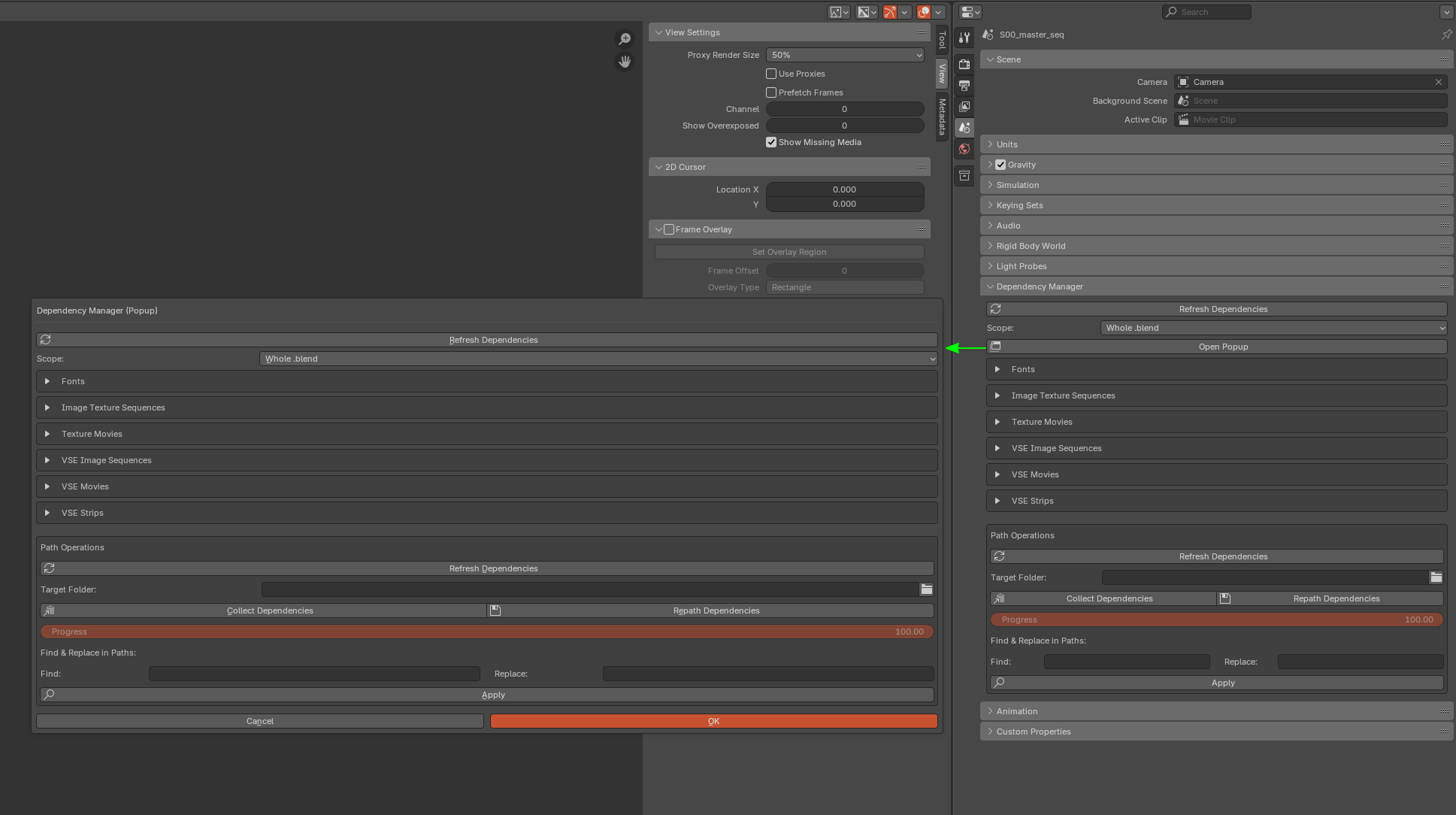
As a work around, I decided to make my own Dependency Manager Addon which allows for an overview of all the scene dependencies. It also allows for easy collecting and repathing of the scene dependencies as well as a nice find and replace function for all the paths.
You can choose to edit the dependencies of the whole .blend or just the current scene.
It also handles the different pathing behaviours required for things like compositor/VSE/Texture sequences and images.
3 Comments
For now, something you can do (and that would be automated with the ability to set project in blender) would be to convert your absolute paths to relative path, I think the command is in the same column where pack resources is located. For that you would have to have your files in the same folder (level) as your .blend (this acts as the set project itself).
So, this way you could send that main folder to the render farm and it should recognize the paths.
Thanks, this is a good workaround. I can't help but feel that Blender would benefit from a visual "Path Manager" to see an overview of all external paths. Whether it be for VSE image sequences or file textures or compositor image input.
Other than using Python, I can't think of a way to list all the texture paths in one GUI.
This way a user could inspect which paths are relative or absolute as well as batch re-pathing.
I know paths can be seen for linked items in the outliner "Blender File" view but I'm not sure how to check all paths.
Maybe there is already a way to do this?
Dream :)
But I think it would be a possibility after they finish working on making "project" files (its in plans or smth)