
Minor Quality of Life Improvements - Edit Right Click Menu Items
Addition & Room for Improvement: Fit To Your Liking
- Sometimes you want your right click menu to have less clutter or look cleaner. Reasons such as menu items you do not need to click because you already use a keyboard shortcut to achieve said result, so having the option to remove them easily would be nice.
- Sometimes clicking most frequently used items feel awkward or tedious moving you mouse to the item's default position. Why not have the ability to to move those items higher up on the list or place them in a position where you feel a lot more comfortable mouse hovering to.
Life Improvement: Configure Right Click Menus
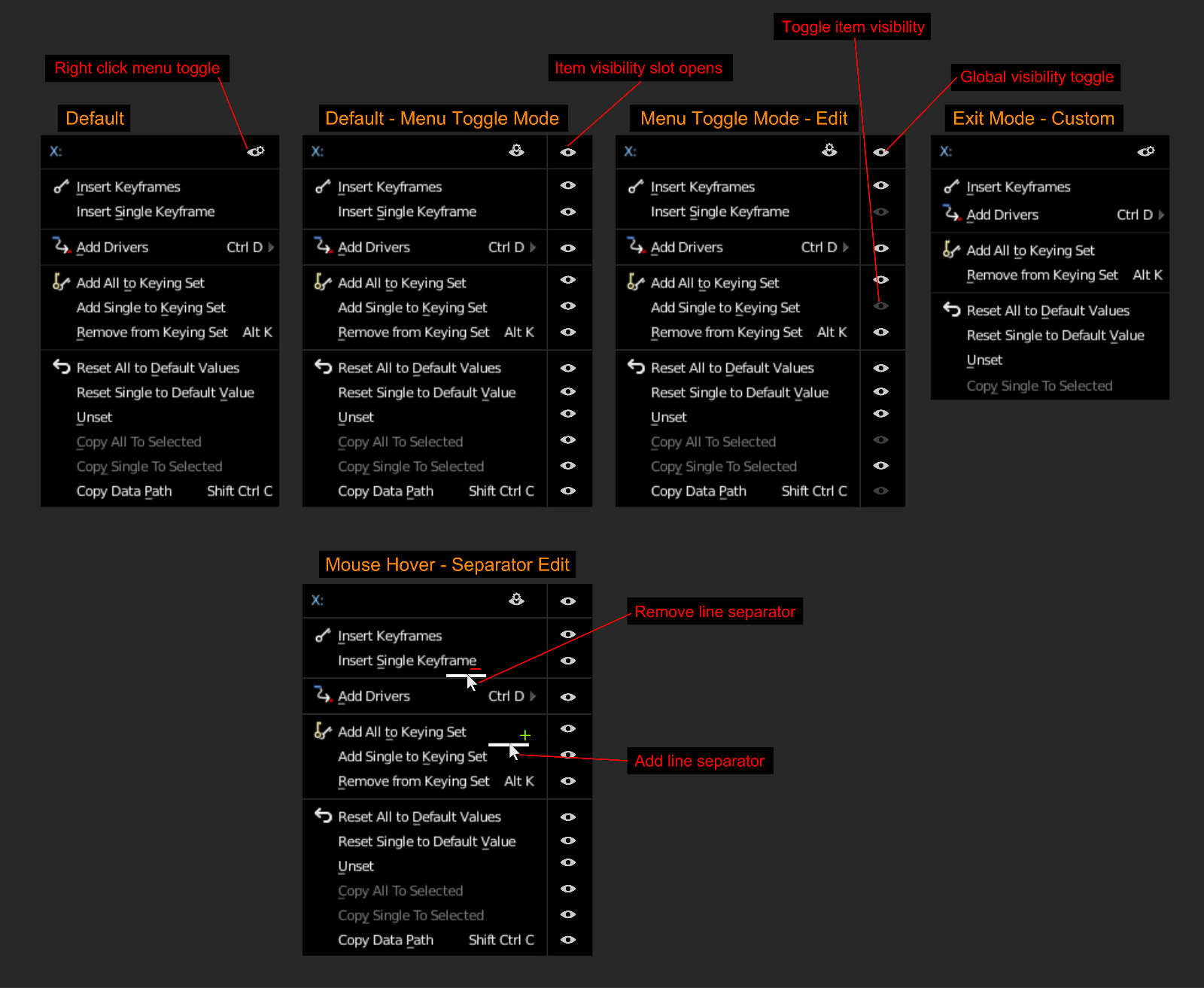
- A straight forward and simple implementation to hide and edit menu items; see diagram.
Extra:
- Forgot to mention in mockup, rearrange items via drag and drop :)
8 Comments
I feel the same as @jason felt for your "Lock other axis proposal" (back and forth wether I like it or not). On one side it's a great idea as it allow to personalize even more and occlude less... On the other side I fear the moment where I will search desperately for a function " to discover that I hided it volontarily some days ago ^^'.
I know that there is always the search bar to get your function if you don't remember ! But it doesn't show you in wich pannel it was...
@bernou.samuel: and maybe adding a visual clue to the menu when the "uncluttered mode" is on? Such as the one that appears in the 3D viewport when you're looking through the camera.
That, or adding a "hidden items" at the bottom that brings them back, just until the menu disappears. The next time it opens would be still in "uncluttered mode"
I personally think it is a fantastic idea, because there are tons of tools that I don't use much and that are always in the way. But you are right, it has the potential problem of confusing the user (much like the last operator in the tools region)
@juantxogargallo: Maybe adding a "Show Default" toggle icon next the right click menu edit toggle in the header. This way its quick to see all the items hidden from the user without changing their custom menu. When they exit or click an item, the menu will revert back to their custom setup upon right clicking again.
One important thing, though. If you later need a feature you previously hid, it would be bad to forget it exists because you've had it hidden for a long time.
When items are hidden, there should be a dimmed message at the bottom of the menu that says something like "5 hidden items..." and have it be a subcategory where all those hidden items live in banishment.
@quargzon: yeah that can also be a good idea. Hahaha banishment, the Blender community from now on should say to all things they choose to hide or don't like, "Send them to the Banishment Zone!"
@fudushae: Ha, I would love to be looking over the latest changes in a new Blender release and see "added banishment".
@quargzon: yes this would add a different level of enjoyment to the release notes.
I like this idea. Maybe the hidden items show up with a CTRL+click or hovering over the menu for a few seconds. That way your most used items are easy to get to, but you still have access to the full menu if needed.