
Face Loop option inside Select -> Select Loops menu
Hello everyone :)
I have a small suggestion. I think that, for the sake of consistency, Face Loop option should be added inside Select -> Select Loops menu.
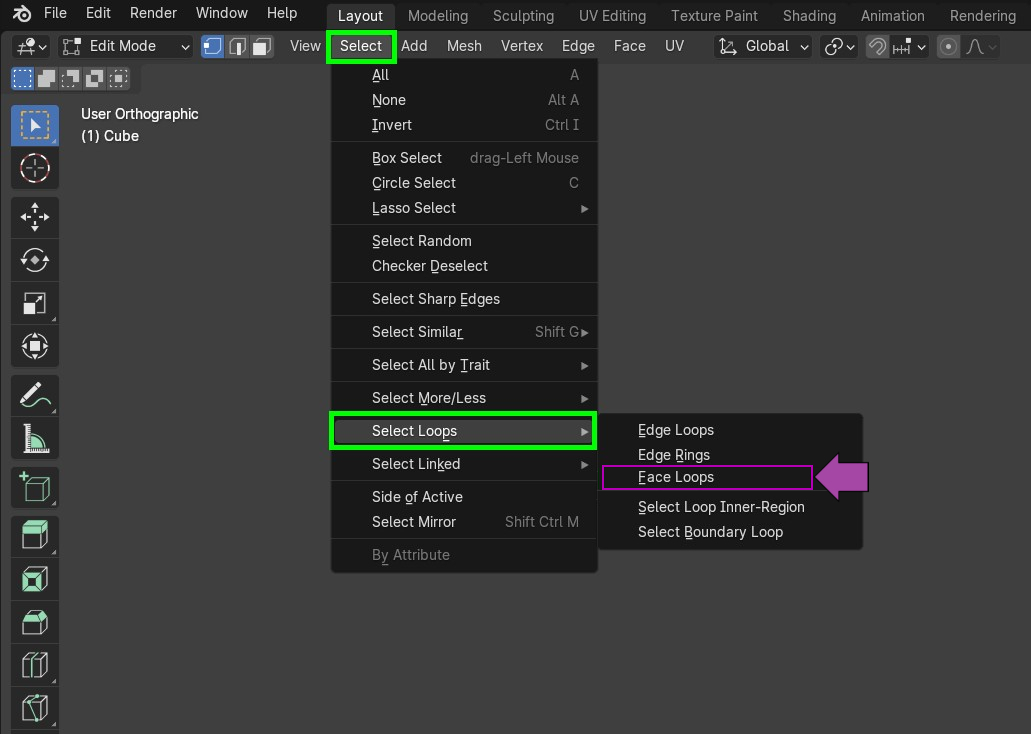
Hello everyone :)
I have a small suggestion. I think that, for the sake of consistency, Face Loop option should be added inside Select -> Select Loops menu.
6 Comments
When you select one or more faces, how can Blender know which direction to select a face loop?
I can think of several solutions for that, but none feel right nor consistent with the rest.
Require at least two faces selected to determine the lop direction. But very inconsistent with edges: requires more than one element selected, edges don't care about neighbors to tell direction, prevents selecting loops of neighbor faces in perpendicular selection), and need a proper UI/UX to let the user know it needs at least two faces, and handle cases where the user didn't select them, or selected more / non-related faces.
Make it a modal operator, where you can point and click the direction regardless of your selection beforehand. But It's a very different behavior from regular edge loop.
What about the edge of a selected face with the smallest index?
I completely agree with you about the new modal operator. Maybe, Select Loops option should be based on Loop Cut and Slide (regardless of active selection). Alt + LMB click (edge loop) / Ctrl + Alt + LMB click (face loop) -> move mouse pointer to set the location and loop direction -> MMB scroll to set the number of loops -> Numpad Plus/Minus to set the length of the loop -> LMB click to confirm or RMB click to cancel.
That one.
@4d_wizard your first proposition sounds like something that will seem unpredictable to most users.
The rest of your proposition sounds a bit complicated.
I forgot to mention that, we already have a mouse-based shortcut to select face loops. Use ⎇ Alt LMB on a face and it will select that face's loop in the direction of the axe formed by the face center and the closest edge from where you clicked versus:
what key screencast key addon is that?
The one and only: nutti/Screencast-Keys: Blender Add-on: Screencast Keys