
New array modifier: Allows UV offsetting
The new Array Modifier from Blender 5.0 does not allow for UV offsetting.
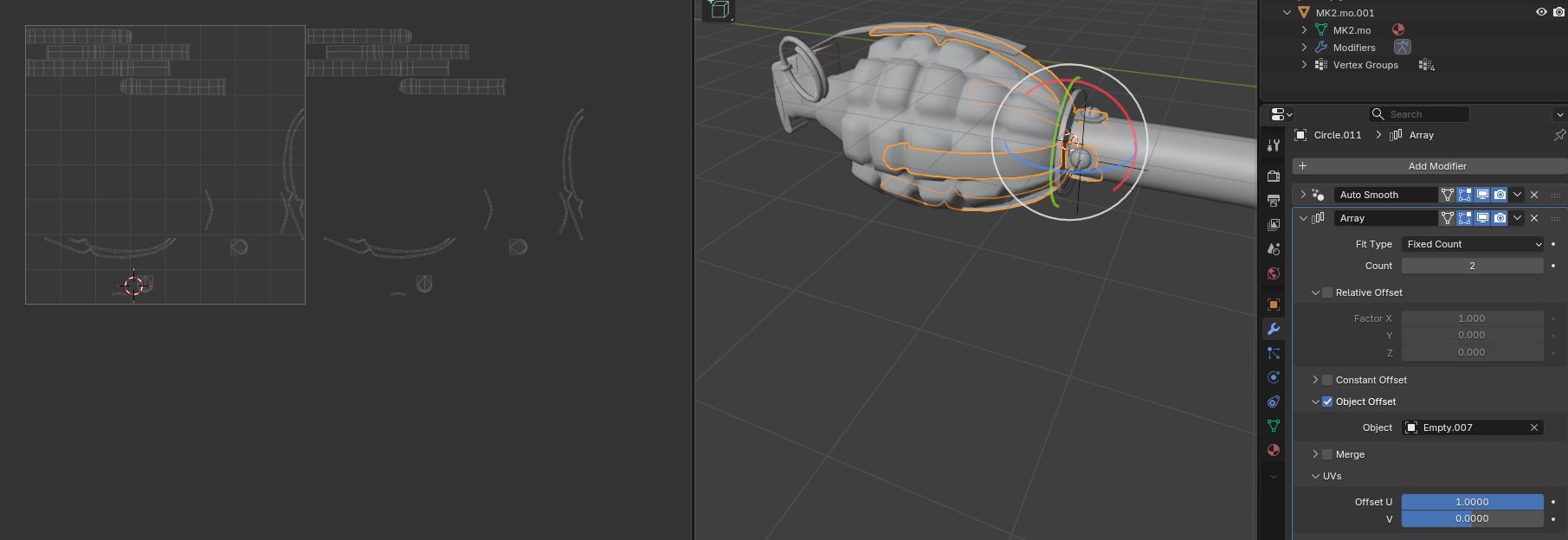
This issue makes it difficult for people to instance mesh and not having the UV overlapping with the main mesh. The ability to not overlap mesh is important for baking textures.
Attached below is an example of the old array modifier with the ability to offset.
4 Comments
This was the reason why the legacy array is still in there afaik. Though it is weird that it's not in the new one since it's really easy to do.
As someone who originally added that UV offset option to og array, Yes, thats very useful for that purpose, and new modifier should get uv options too, but geometry nodes themselfs needs to be improved for that.
For now you can modify original array or create uv post-process array modifier like that: but You have to know and set uv channel name. (that`s current limitation of GN)
Landed here while I was searching for this issue. Thank you for sharing this. Just to let you know, it goes a bit haywire when merging vertices is used. For example radial array with single vertex at the center.
Not sure if it's solvable with what geometry nodes offer now. Maybe this is why you mentioned geo nodes needs improvements.
For now workaround for me is to disable merge by distance in array and add it as separate geometry nodes modifier after yours.
Sorry, i don't use 5.0 yet, so i didn't catch that.
Dont use "merge" from array, but merge by distance mesh after moving those UVs. Let me know if this helps, or if there is other issue with that.