
Make empty axes and lattice objects snappable
Right now you can only get a snap at the center of an empty. It would be really handy to be able to snap to the axes/endpoints/vertices of empties and lattices.
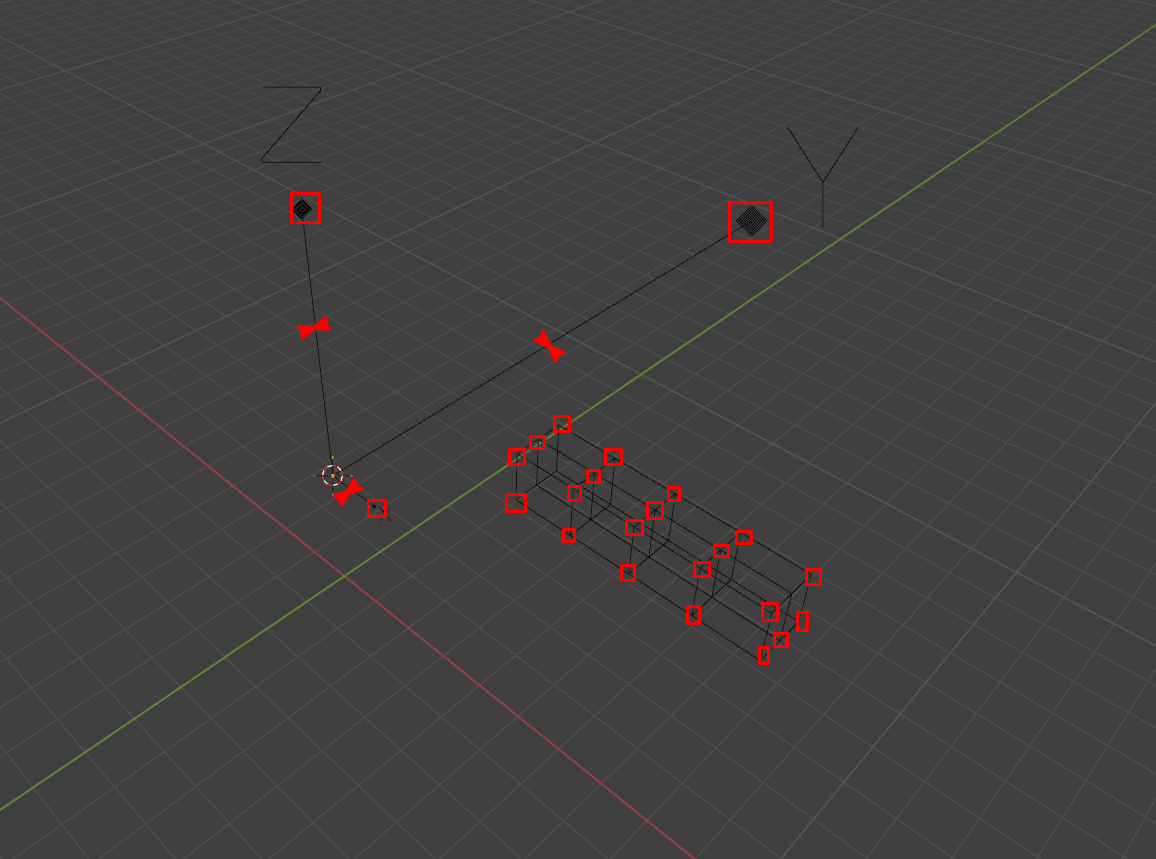 As I draw on the image, ideally one could snap to the ends of each axes based on the empty xyz scale.
This is particularly useful when working with a set of grid-lines that constrain the geometry.
Also you should be able to snap lattices as right now i find it's really frustrating to get the position and scale of a lattice correct or exactly matching the modified geometry. Leading to be constantly deleting and creating new lattices based on the selected objects (the new "lattice deform selected")
As I draw on the image, ideally one could snap to the ends of each axes based on the empty xyz scale.
This is particularly useful when working with a set of grid-lines that constrain the geometry.
Also you should be able to snap lattices as right now i find it's really frustrating to get the position and scale of a lattice correct or exactly matching the modified geometry. Leading to be constantly deleting and creating new lattices based on the selected objects (the new "lattice deform selected")
3 Comments
Nice
For lattices (your main pain point): Select geometry → Shift+A → Lattice → Lattice Deform Selected → instantly creates + positions + scales a lattice perfectly around your selection and adds the modifier. No manual tweaking needed. For snapping to Empty axes endpoints: No native snap to Empty axes/ends. Quick reliable workaround:
Add a single Mesh → Single Vert (or tiny line). Parent it to the Empty (Ctrl+P → Object). In Edit Mode move the vertex to e.g. (Empty.scale.x, 0, 0) for X-end (type values or use snap + axis constrain). Repeat for Y/Z if needed (duplicate vertex). Now enable Vertex snapping → snap anything to those points. They follow Empty scale/location.
Alternative (even faster for repeated use):
Use 3D Cursor tricks: select Empty → Shift+S → Cursor to Selected → then snap with Cursor as pivot or increment snap along axes.
Native snapping still ignores Empty axes and Lattice points entirely (only works inside lattice Edit Mode for its own points).
Yes, I frequently end up using your 2 first workarounds, but when working with lattices I sometimes want to do some alignment changes that break the tight relationship you achieve with the Lattice Deform Selected. And for the mesh one I find that I then end up with a quite cluttered scene and I just find it a bit cumbersome.
Though thank you for the suggestions, they would have saved me the headache I had figuring out the solution myself.