
Display Colored Edges
Hi,
It would be great if Blender could display colored edges in the viewport.
I often work with .dwg plans and convert it to .dxf
A correct way to display the curves would be like this :
 Each curve is linked to a specific colored layer and displayed accordingly, with the corresponding color.
But Blender can't display color on anything other than a face.
So if it is imported as a raw .dxf ( real curves ), or as a .dae ( edges from curves ) after a conversion in Accutrans3D it is displayed like that :
 It is far less readable than with colors, no ?
These days I convert all the .dwg files I receive into .dae file because it gives predictable results through the conversion of the .dxf curves to edges. In addition, the conversion process transfer layer color data to material color data.
So what is missing is Blender's ability to display material color on edges and vertices, to get something like this in the viewport :

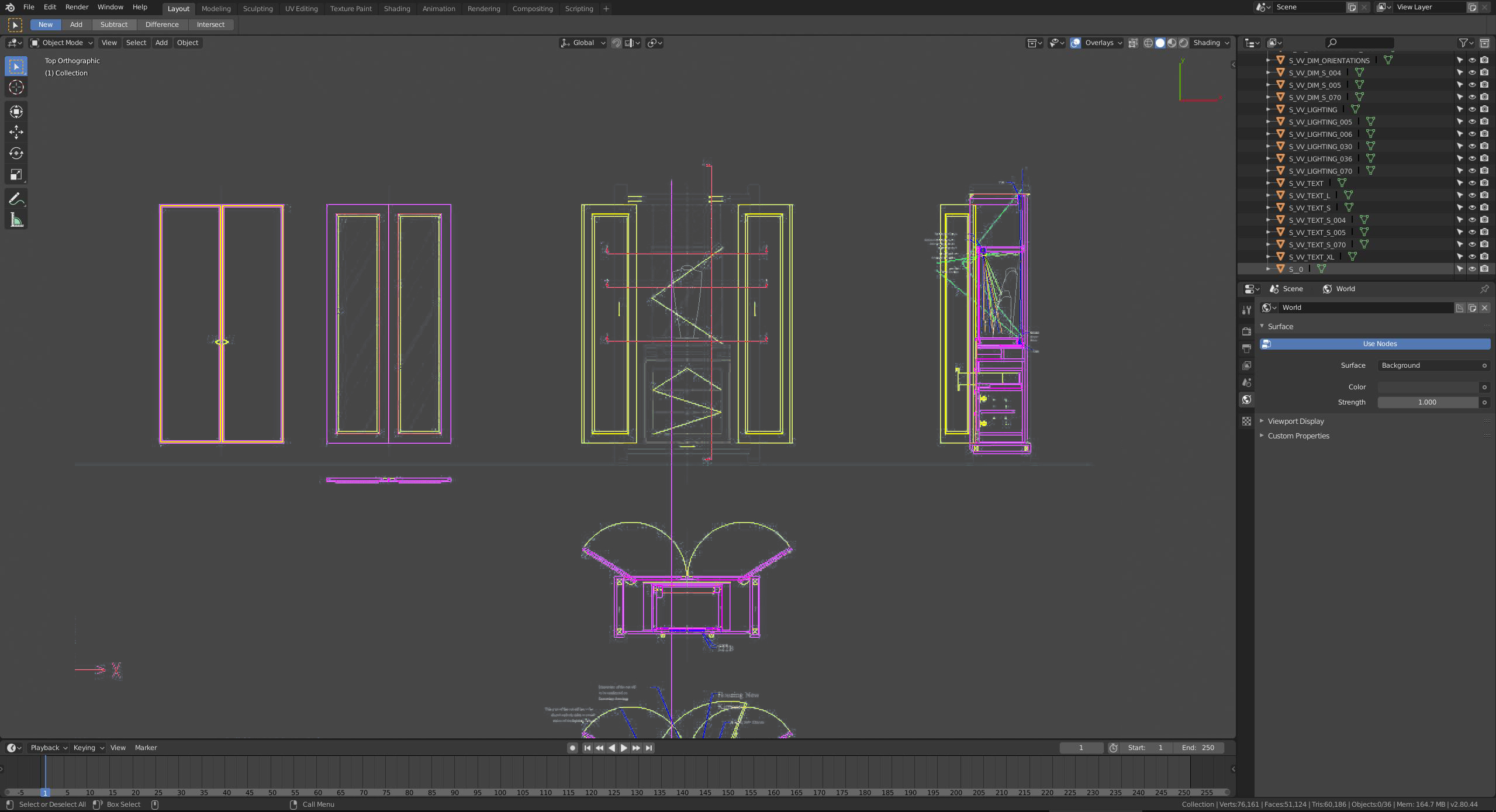
26 Comments
Need it right here right now!!!!
It is not " could be helpful " feature. It is " must have " feature for architectural modeling!!! I suspect not only.
Missing of such ability - one of reasons why people don't use Blender as often as they can.
Right now my work in Max. All things colorcoded for easy work.
Same in Blender. All thngs black and different things are difficult to distinguish
GREAT NEWS! Clament Foucault has been working on this. It looks like it will be in upcoming builds. lists.blender.org/pipermail/bf-blender-cvs/2019-February/120009.html
2.8 already has the ability through overlays menu to choose how objects are displayed with lots of variables linked together. There should be something like this :
* @-L0Lock- * Yes it would make sense, I just don't know if it's hard or not to implement on the code side.
* @Jason van Gumster * should it be marked as «Done»?
4 years have passed and this feature has not yet been added. Is this difficult to implement?
Can be marked as DONE now?
* @Eugene D * IMO not done. Not even close. They made wireframe colors for wireframe view mode... ONLY!!!!!! F*** ONLY!!!! I need it not only in wireframe mode. Same with spline/helper objects - this have no wireframe color at all, u can set object color, but it affect none.
It looks like some stupid joke. Like some " developer " look at my screenshot from 3d Max and just do " exactly what's on screenshot " - wireftrame colors for mesh in wireframe view mode..... Like he was some " unic person " who have never seen how it look in other software.
* @IIIFGIII * for me the main issue with wireframe colors is big color shift visible color from what I set (in object color for example). Very annoying thing.
Does anyone aware of anything about "in development" status for this feature?
What do think of the new (very new) multiple colors in wire mode? Does this answer the problem?
Hooray! Pablo Vazquez recently uploaded a video that random wireframe colors have been implemented! So can we mark this post status as "Done"?
* @fudushae * Not really unfortunately, see my answer below.
It have been added literaly today.
yup ! youtube.com/watch
* @Pawel Piotrowski * It's a step in the right direction but not exactly what I request. I've downloaded today's build and my blueprint is still displayed like before.
The colored wireframe is nice but it works only if the object has faces. So in the case of a blueprint drawn with edges, it is still displayed as black. In this case only the text items are made up of faces, so only these ones are displayed with random colors in the new wireframe mode.
A mesh item can already contain only edges, and have material data in the same time. We need a way to link these two and display it in the same way than polygons.
* @Pierre * It looks like bug and not intended behaviour.
It's just initial implementation. It most likely will be improved before 2.80 release.
Vote for edge groups: blender.community/c/rightclickselect/CFcbbc/edge-groups-similar-to-vertex-groups-please It is important step to more handy operations with edges
Don't spam, please...
* @-L0Lock- * it is not a spam, it is reated topic!
I like that idea. It could be helpful unless you can turn it on/of. Maybe 2.8's random color can be applied to wireframe?
* @hal.9 * Yep, I guess a correct implementation would use the actual Color properties in the shading panel, like for faces. So you have always the choice. The random color mode could be helpful in some cases in terms of readability.
* @hal.9 * already implemented
{attachment 040241jpg}
* @Pierre * I agree, but there should be edge groups before. It is more important for different tasks, not only for colors.
* @ Vyacheslav * It depends what important means to you ;) Edge groups would be very useful and I hope so see it in Blender one day too ( coming from Modo, I miss selection sets ), but a proper display of technical data / CAD file could convince many potential users to take the leap, which is good for all Blender users.
* @Pierre * ofc U R right! More users — better for the Fund and Blender and us. Blender have so many opportunities, but often it is difficuilt to use them
For me fast and simple usability is important. In this case — ability to mark and color groups of edges. In general — fast and easy prototyping, like cutting out pieces of mesh by one stroke for example (working on it now)