
Convert: Curve to Mesh preserve curve radius as Skin Modifier Weights
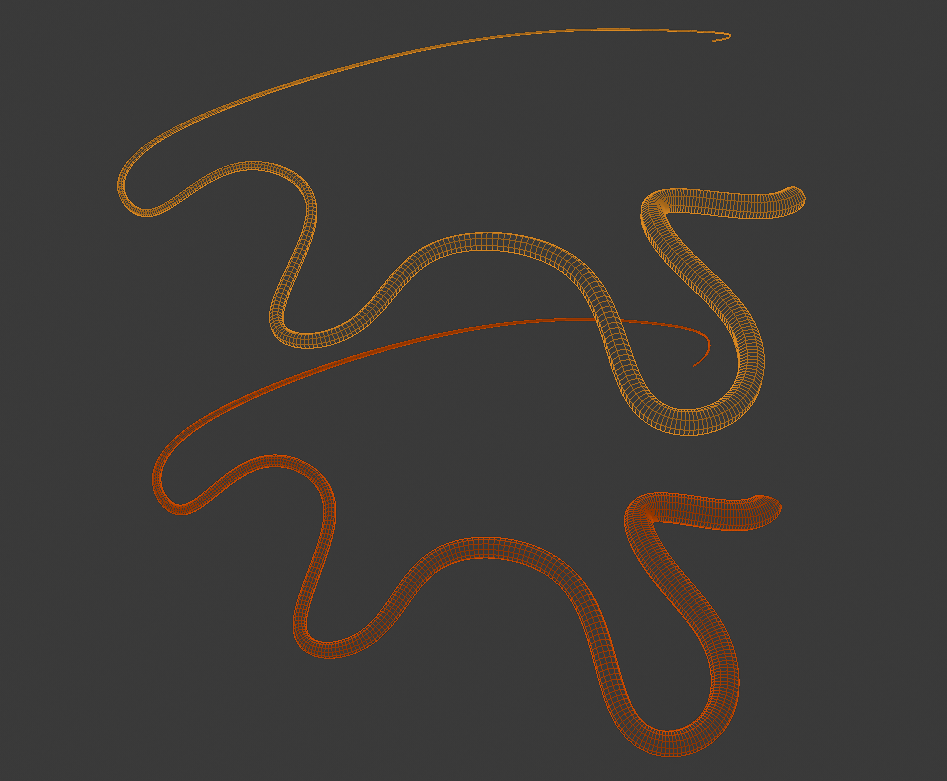
I propose an option in the CONVERT TO MESH menu, to save a curve's bevel radius to the new mesh as skin modifier weights. The new mesh would be an identical clone using the skin modifier instead of curve/bevel.
Why is this useful? Because in many cases, a curve must be converted to a mesh to be useful. Keeping the curve's radius around in the form of skin modifier weights would enable artists to tweak the curve's fill long after converting it-- by now we're all aware of how great the skin modifier is! Since the Grease Pencil is converted to curves, you could convert GP curves to meshes quickly, and retain a lot of the same utility of GP edit mode.
In particular, I want this feature because it would make Python scripting easier- instead of having to transfer the attributes with Python, I could ask Blender to do it for me. Then I could use bmesh to access the data, and get cookin'.
3 Comments
Great Idea
I worked with this some. And I think conversion should have checkbox, that is off by default: in most cases ppl do not know and do not need this additional data.
* @ Vyacheslav * I agree. But right now, it's surprisingly difficult to copy it over! I've been toying with a Python script that does this, but the math behing B-Splines is beyond my grasp. Fortunately, Bezier Curves can subdivide and keep their shape exactly (for any tangent but Automatic), and NURBS seems to use the same subdivision algorithm as meshes, meaning I can convert the data-points of the curve to a mesh, copy the attributes, then subdivide the mesh and get the same shape as the NURBS object.